

LastPass is a reliable password manager that can help you boost your productivity. Instead of manually typing your login information every time you need to sign in to your online accounts, let LastPass take care of everything. While the tool can be beneficial, it does come with its fair share of issues.
Many users complained LastPass sometimes logs them out of their account, forcing them to enter the master password manually to log in again. If you’re experiencing the same problem, pursue the troubleshooting methods below.
Fix: LastPass Keeps Logging Me Out
Check Your LastPass and Browser Settings
Oftentimes, LastPass prompts you to log in again due to incorrect account settings.
- Click on your LastPass extension icon and select Account settings.
- Then go to the Advanced tab and scroll down to the share login state option.
- Check if the Share login state between browsers option is enabled.

- If this is the case, disable it and check if LastPass still logs you out of your account.
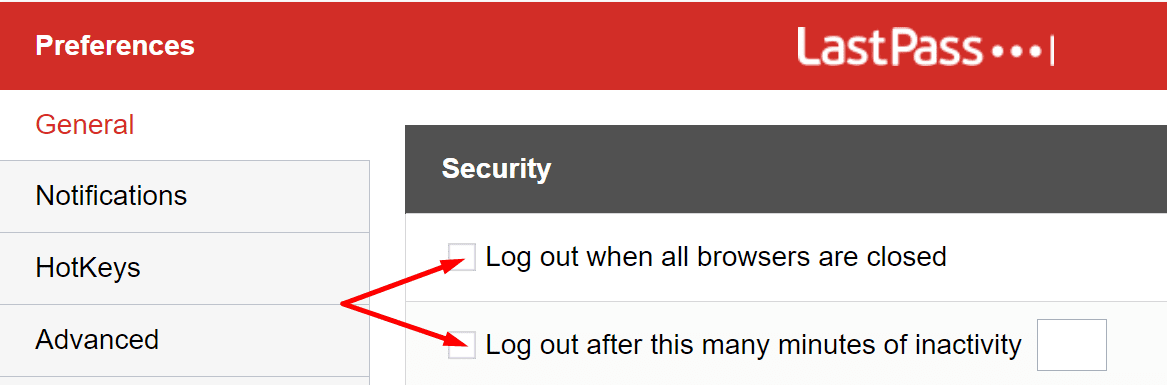
- Then go back to General and, under Security, disable these two options: Log out when all browsers are closed and Log out after this many minutes of inactivity.

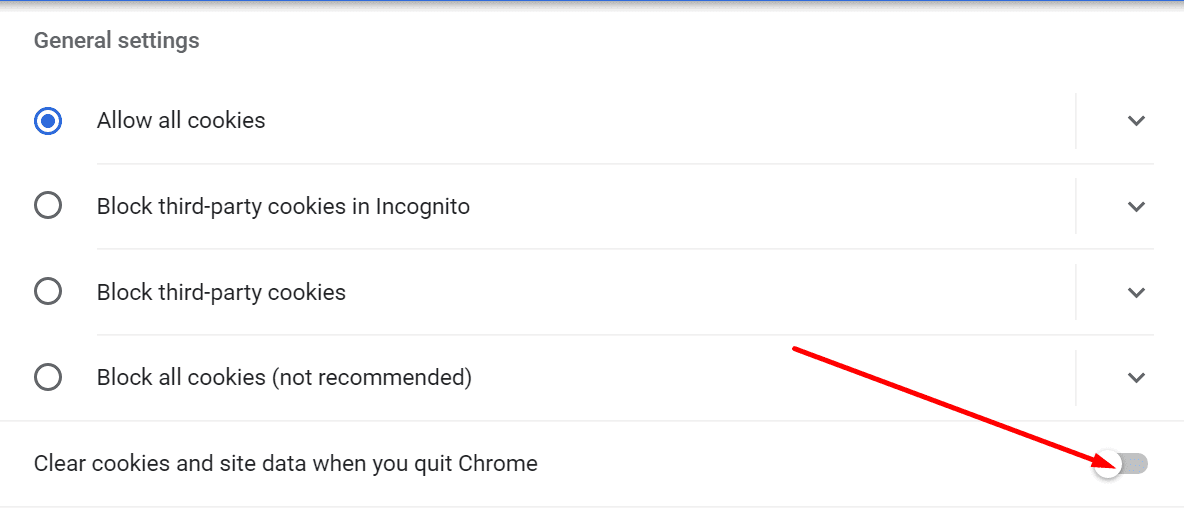
Next on the list, check your browser settings. Make sure your browser doesn’t automatically clear your cookies when you close it.
- On Chrome, navigate to Settings and select Privacy & Security.
- Then go to Cookies and other Site Data.
- Go to Clear cookies and site data when you quit Chrome. Make sure the option is disabled.
Disable Your Extensions
Additionally, if you use other browser extensions, especially privacy extensions and ad blockers, disable them and check if the issue persists. Adblockers and privacy-focused extensions often interfere with the other extensions, potentially breaking certain features.
On Chrome, click on the Extensions icon in your browser’s toolbar or go to More tools and select Extensions. Switch off your extensions, relaunch the browser and check if the issue is gone.
If this method solved your problem, re-enable your extensions one by one to identify and uninstall the culprit.
Check Third-Party Utilities
Keep in mind that third-party utilities such as CCleaner, System Mechanic, and others can delete your session cookies. This includes all the login information LastPass saved during the respective session.
So, if you use various system cleanup tools, check their cookie settings. Disable all the options that automatically delete your session cookies or add an exception for LastPass.
Reinstall LastPass
If the issue persists, uninstall LastPass, restart your computer and download the tool again. If the password manager got corrupted, reinstalling it should fix the problem.
Conclusion
To conclude, if LastPass keeps logging you out, check your settings and disable the option that automatically logs you out after you close your browser. Additionally, make sure your browser doesn’t automatically clear the session cookies when you close it. Did you find other solutions to fix this problem? Feel free to share the steps to follow in the comments below.


Ginny Sutcliffe’s comment saved me, it solved my problem too:
– remove last pass
-open new window in incognito mode
-go to lastpass.com, login
-go to account settings
-go to advanced settings
-set iterations to 600000
-click update
-re-install last pass extention
done!
Received this from LastPass. Changing the Iterations to 600000 fixed the issue for me.
Please try to login on an incognito window by going to lastpass.com . (IF this works please reinstall the extension) If that doesn’t work please help us to try accessing your Vault, then go to Account Settings, Show Advanced settings, change iterations to 600000 and clicking on Update.
None of the above worked for me either. I am at a loss. LastPass is nothing but a storage account without the extension… If anyone has any other ideas please post!
My menus are different than your examples in my extension and in the vault
No “Share login state between browsers”, etc
i found a couple items that are kinda what you’re talking about and set them
In Chrome Settings, go to Autofill, then Password Manager. Toggle “ON” Auto Sign In. Then restart. It worked for me!
Nope. None of this did the trick. Really annoying. It used to keep me logged in but one day, it stopped.
No. “Share login state between browsers” option does not exist in my version of Last Pass.
None of this works. A lot of it no longer matches Lastpass app options, but the parts that do don’t fix the problem.
No there is no “account settings” in the dropdown