Skip to content
LogoTechnipages
technipages logo
  • Topics
        • Android
        • Browsers
        • Gaming
        • Hardware
        • Internet
        • iPhone
        • Linux
        • macOS
        • Office
        • Reviews
        • Software
        • Windows
        • Definitions
  • Product Reviews
  • Downloads
  • About

How to Fix Microsoft Teams Error c02901df

Madalina DinitaJanuary 22, 2021 Comments (0)
Fix Microsoft Teams Error c02901df

Error code c02901df indicates the Microsoft Teams desktop app ran into an issue and crashed. This error usually occurs on Windows 10 computers. In some instances, the app also displays alerts such as  ‘No internet – reconnect‘ or ‘We ran into a problem. Reconnecting‘.

However, the Internet connection is not the problem. If you open the browser version of Teams right after the desktop app failed to connect, you’ll see you can access the service.

Solutions to Fix Microsoft Teams Error c02901df

Reset the Teams App

Resetting the Teams app could help you to bypass this error. Here are the steps to follow:

  1. Exit Teams.
  2. Go to the Windows Search bar and copy-paste the following path: %appdata%\Microsoft\Teams.microsoft teams cache folder
  3. Then delete all the files from that folder.
  4. Launch Teams again, sign in, and check if the error persists.

Reinstall Microsoft Teams

If you’re still getting the same error, reinstall the app.

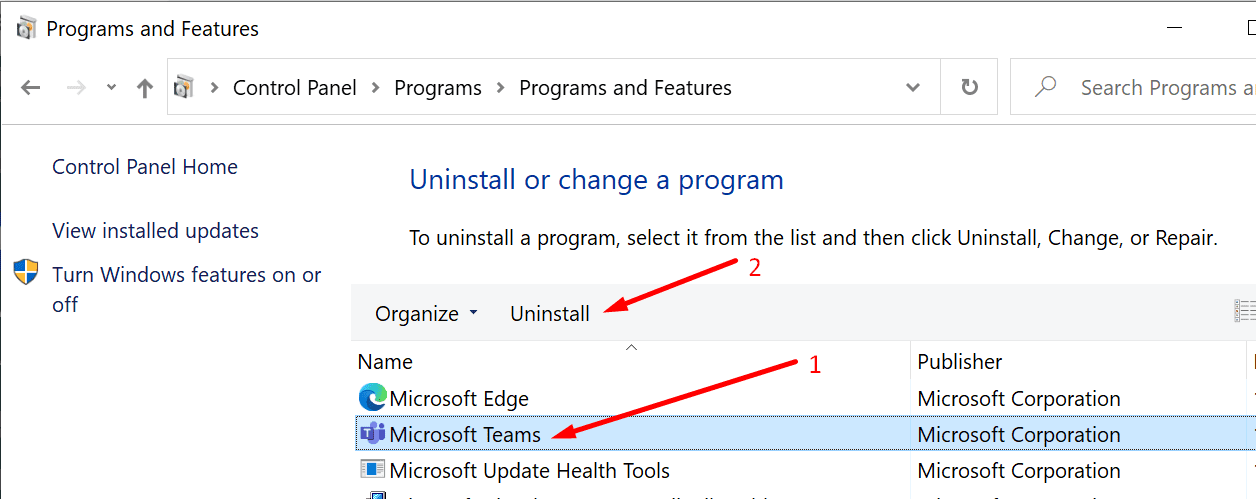
  1. Navigate to Control Panel → Uninstall a program.
  2. Then select Microsoft Teams and hit the Uninstall button.uninstall microsoft teams
  3. Restart your computer and download the Teams app from Microsoft’s website or Microsoft Store.
Delete Your Microsoft Account From PC

Some users said they managed to temporarily solve this issue by deleting the Microsoft account registered on their computers. Try this workaround and then reconnect your account.

Keep in mind this is only a temporary solution. Unfortunately, the problem re-appears some time later.

Update Your OS

Other users got rid of this problem by upgrading their operating system. If you’re not running the latest Windows 10 version, go to Settings, select Update & Security, and click on Check for updates.update windows 10

Teams users said that updating their operating systems solved the connectivity error messages associated with error code c02901df.

Let us know if you managed to fix this problem. Hit the comments below.

Categories: Software

Author Madalina Dinita

You Might Also Like

  • How To Use Hulu Watch Party Feature

    MonaSoftware
  • zoom time zone errors

    Troubleshooting Zoom Time Zone Errors

    Madalina DinitaSoftware
  • 5 Free PC Benchmarking Tools

    Mel HawthorneSoftware
  • How Does Burp Suite’s Intercept Function Work?

    Mel HawthorneSoftware

Leave a Reply

Your email address will not be published. Required fields are marked *

This site uses Akismet to reduce spam. Learn how your comment data is processed.

300x600
Turning on Triple Touch Zoom on Android

Turning on Triple Touch Zoom on Android

How to Connect Outlook 2023 to Gmail

How to Connect Outlook 2023 to Gmail

Netflix: Change Password

Netflix: Change Password

Everything You Need to Know About WhatsApp Delete for Me

Step-by-Step Guide: How to Use WhatsApp on Your Computer

Android: Enable or Disable Background Data

Android: Enable or Disable Background Data

300x250
profile pic

The Experts Behind Technipages

My name is Mitch Bartlett. I've been working in technology for over 20 years in a wide range of tech jobs from Tech Support to Software Testing. I started this site as a technical guide for myself and it has grown into what I hope is a useful reference for all.

Learn More

300x250 2
technipages logo white
linkedin icon

Technipages is part of Guiding Tech Media, a leading digital media publisher focused on helping people figure out technology. Visit guidingtechmedia.com to learn more about our mission and team.

© 2026 Guiding Tech Media All Rights Reserved

  • About Us
  • Contact
  • Legal & Privacy

© 2026 Guiding Tech Media All Rights Reserved

Information from your device can be used to personalize your ad experience.
Do not sell my personal information.