
Sometimes, when Zoom users try to set up a meeting, they might get the ‘Please check the current timezone’ error.
For example, if you’re using Zoom and Outlook, the error message will read as follows: ‘Please check the current timezone in Microsoft Outlook regional configuration’.
When checking the regional configuration, they might see a ‘Working on it’ notification in the timezone section.
If you encountered the same problem or any other time zone-related Zoom issue, you can use this troubleshooting guide to fix it.
How To Fix Time Zone Errors on Zoom
1. Update local machine time zone settings
To set your time and time zone on Windows 10, navigate to Date & time, and you can either let Windows 10 select your time zone automatically or set it up manually.
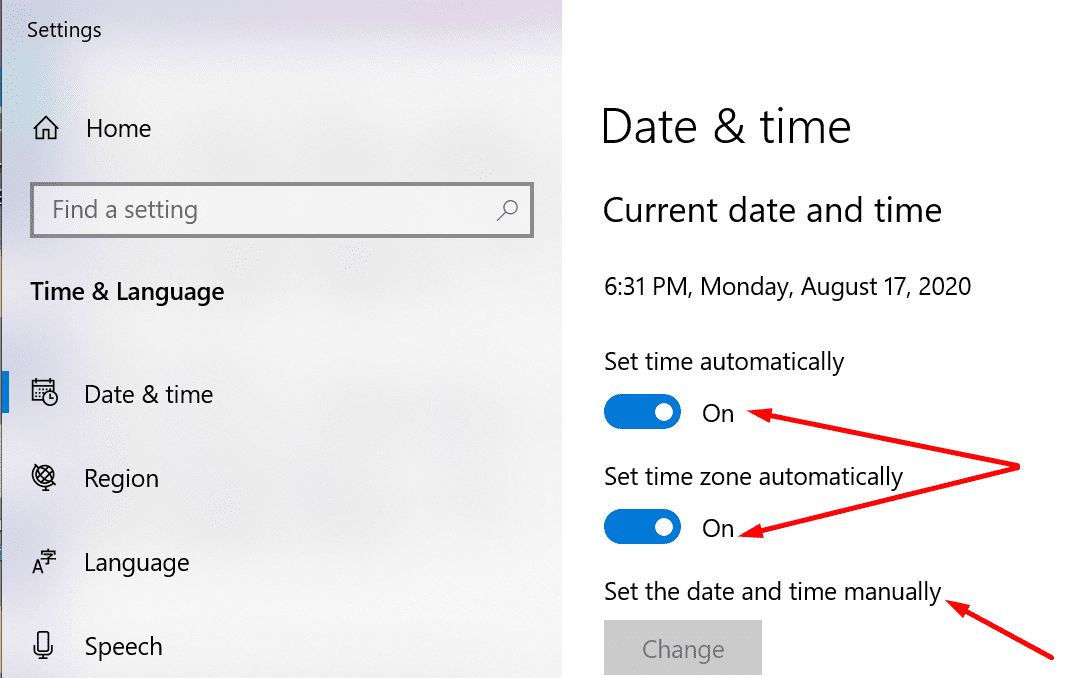 If you enabled Windows to set the time zone automatically, try tweaking the settings manually this time — and the other way around. Check if this quick workaround fixed the problem.
2. Tweak your Zoom time zone settings
- First, make sure your computer is on the right time zone
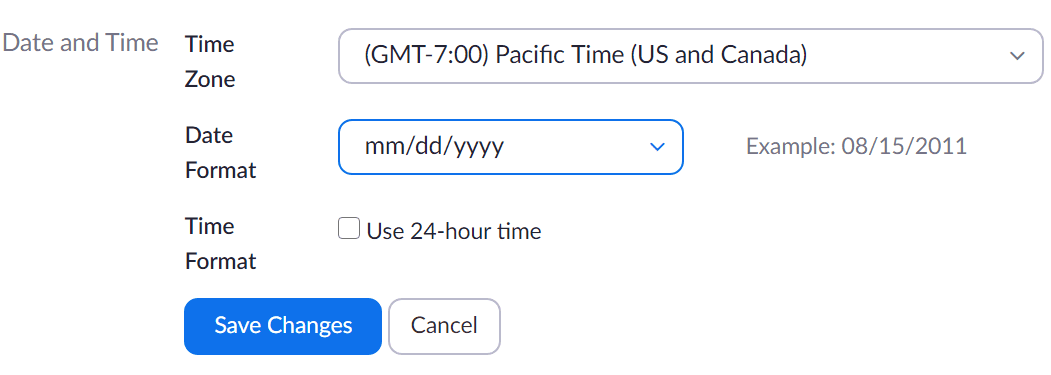
- Then, log in to Zoom and click on My Profile
- Scroll down to Time Zone → hit the Edit button
- Select your current time zone (the region where you currently live) and save the changes.
3. Update Zoom
Every now and then, Zoom has been affected by time zone issues. But every time, the company was quick to release a specific hotfix.
That’s why you should check for updates and install any pending Zoom updates.

4. Uninstall the Zoom plugin
Another thing you can do is disable the Zoom plugin for the program affected by the timezone error.
After you did that, restart your computer and launch the problematic program again. Reinstall the Zoom plugin and check if the problem persists. If the fourth solution didn’t work, go to the next one.
5. Reinstall Zoom
Uninstalling the Zoom client may be the last thing on your list, but if nothing worked, this should fix it. If certain Zoom files got broken, corrupted, or deleted, reinstalling the program is the only way to restore all the features and get rid of errors and glitches.
To uninstall Zoom:
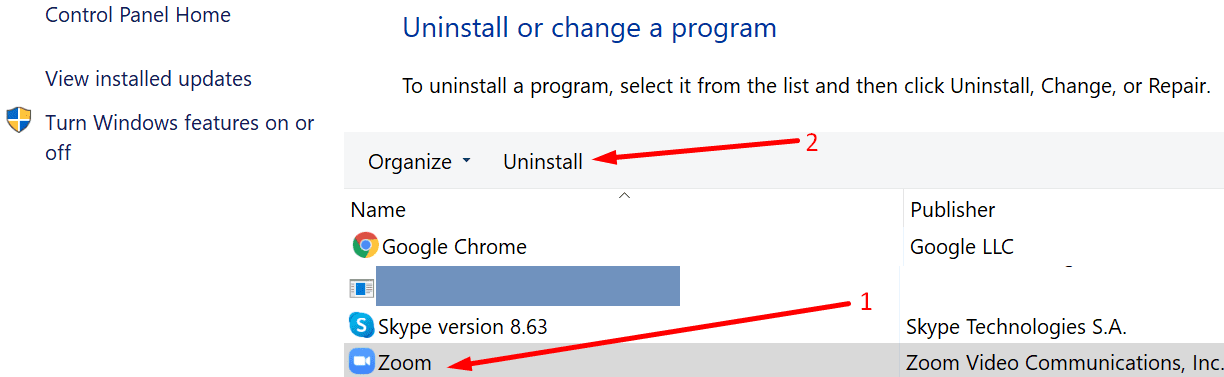
- Open the Control Panel
- Go to Programs & Features, and select Uninstall a program
- Select Zoom in the list of programs and click on the Uninstall button.
Time zone errors should be gone now and you should be able to take full advantage of the world’s most popular video conference and remote collaboration tool.


Same issue with me. Computer is on the right time zone. Have uninstalled. Reinstalled. On google calendar it states the time, but when I click on make it a zoom call, it changes the time to an hour earlier or a completely different time!!!
I’m having the same problem as Kathy. I schedule a meeting for 7 central time zone and it says the meeting will begin at 6 central. I can’t figure out how to fix it. My computer is on the correct time zone….
I’ve done all this. I went out of town, I entered some zoom meetings into my google calendar. When I came back in town, I changed the time zones on my computer, made sure it was right in my google calendar, zoom, everything. I’ve unintalled, reinstalled, signed out of every device on zoom, reinstalled. The zoom meetings listed are still the wrong time zone! Why???????