

Joining Zoom meetings should be as easy as a walk in the park. You just click on the invite link or enter the meeting ID and you’re in. But things don’t always work that way.
Attendees may sometimes get various errors preventing them from joining the meeting. Or they can’t join the meeting because the host has restricted access to it.
What does it mean when Zoom says the meeting is for authorized attendees only?
Zoom meeting organizers can choose to allow only certain accounts to join the meeting. If you’re not using a user account or email address that’s authorized in the meeting settings, you’ll get an error message that says “This meeting is for authorized attendees only“.
At that point, you usually have two options. The first one is to hit the Cancel button and give up joining the meeting. Or you can click on the Switch account or Sign in to join option and use an account the host authorized to join the meeting.
What to Do if a Zoom Meeting Is for Authorized Attendees Only
Signing in to Zoom with the email address the host used to invite you to join the meeting should solve this problem.
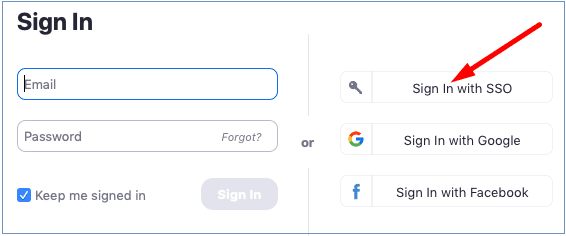
If your Zoom account is managed by an organization, sign in with SSO if the option is available. Select ‘Sign in with SSO‘, enter your company domain, and hit Continue. Then enter your username and password to log in to your account.
Conclusion
Zoom meeting organizers can authorize only specific email addresses to join the meeting. If the email address or Zoom account you’re using is not on the list, Zoom will alert you the meeting is for authorized attendees only.
We hope this guide answered the questions you had on this Zoom error. Feel free to hit the comments below and share your thoughts on this topic.




This happened to me today, i had an interview through zoom and it just would not let me in even though i used the same email and clicked on the link directly from my email. Is this a fault on zoom or the fault of the employer? Now their recruitment team is saying there are no more interviews left for this role as if it was my own fault for missing it! So annoyed!
I’m getting the same thing and I am logging in from the email that the link was sent to…frustrating
Zoom works on my desktop, but on the laptop, it hits me with the error msg: This Meeting Is for Authorized Attendees Only. Please help
I logged in using the email invited with and was still unable to join the meeting. Kept getting the “Meeting is for authorized participants only” window.
I updated Zoom yesterday on my laptop to prep for an interview today. This “unauthorized user” error screwed me over. I was trying to sign in with the correct email address the organizer used too. Total mess, made me look like an idiot.
NO!!! I tried, BUT IT FAILED!!
This did not help. I’m sending zoom invites to clients from other companies. They receive the invite, so that means they have ‘signed in’ as an authorized attendee.. Suddenly (since the last Zoom update) attendees from my clients are receiving prompts, “This meeting is for authorized attendees only” . They are authorized attendees. The prompt instructs them to ‘sign in’. Sign in to what? They don’t have an individual Zoom account – they are employees of large companies! This behavior just started two weeks ago with the new Zoom update push. And of course, it is impossible to find an actual support person to talk to.