Skip to content
LogoTechnipages
technipages logo
  • Topics
        • Android
        • Browsers
        • Gaming
        • Hardware
        • Internet
        • iPhone
        • Linux
        • macOS
        • Office
        • Reviews
        • Software
        • Windows
        • Definitions
  • Product Reviews
  • Downloads
  • About

Windows 10: Fix Error 0x81000203

Mitch BartlettFebruary 4, 2021 Comments (0)
Windows 10 Header

When trying to use the System Restore option under System Properties in Windows, you may get the following error:

There was an unexpected error in the property page:

System Restore encountered an error. Please try to run System Restore again. (0x81000203)

Please close the property page and try again.

Windows 10 Error 0x81000203

The following steps usually help solve this issue.

  1. Select the “Start” button, type services.msc, then press “Enter“.
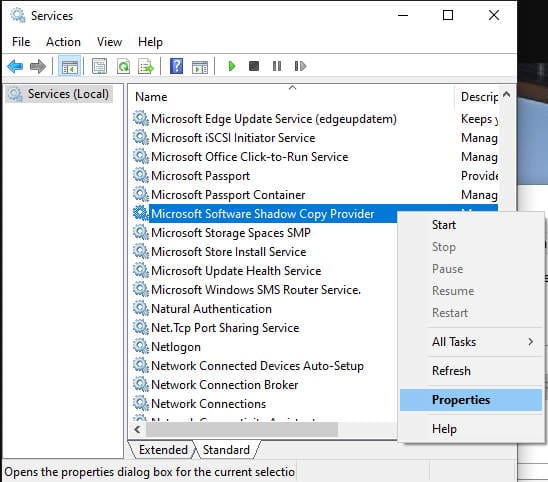
  2. Find the “Microsoft Software Shadow Copy Provider” in the list. Right-click on it, then select “Properties“.
    MS Software Shadow Copy Provider Properties Option
  3. Ensure the “Startup type” is set to “Automatic“. Select the “Start” button to start the service, then click “OK“.
    Windows 10 swprv Service Start
  4. Restart the computer, then try to access the System Restore feature again. I hope that this has solved the error for you!
Categories: Windows

Author Mitch Bartlett

My name is Mitch Bartlett. I've been working in technology for over 20 years in a wide range of tech jobs from Tech Support to Software Testing. I started this site as a technical guide for myself and it has grown into what I hope is a useful reference for all. Mitch's Favorite Gear ATX Graphics Card CanaKit Raspberry Pi 3

You Might Also Like

  • Win7 User Account Control settings

    Enable or Disable User Account Control (UAC) in Windows

    Mitch BartlettWindows
  • Windows 11 Disable Are you sure you want to move this file to the Recycle Bin Dialog

    Windows 11: Disable “Are you sure you want to move this file to the Recycle Bin?” Dialog

    Mitch BartlettWindows
  • Fix-Windows-10-File-History-Error-200-and-201

    Fix Windows 10 File History Errors 200, 201 and 203

    Madalina DinitaWindows
  • fix-error-occurred-while-creating-directory-windows-10

    Windows 10: An Error Occurred While Creating the Directory

    Madalina DinitaWindows

Leave a Reply

Your email address will not be published. Required fields are marked *

This site uses Akismet to reduce spam. Learn how your comment data is processed.

300x600
Turning on Triple Touch Zoom on Android

Turning on Triple Touch Zoom on Android

How to Connect Outlook 2023 to Gmail

How to Connect Outlook 2023 to Gmail

Netflix: Change Password

Netflix: Change Password

Everything You Need to Know About WhatsApp Delete for Me

Step-by-Step Guide: How to Use WhatsApp on Your Computer

Android: Enable or Disable Background Data

Android: Enable or Disable Background Data

300x250
profile pic

The Experts Behind Technipages

My name is Mitch Bartlett. I've been working in technology for over 20 years in a wide range of tech jobs from Tech Support to Software Testing. I started this site as a technical guide for myself and it has grown into what I hope is a useful reference for all.

Learn More

300x250 2
technipages logo white
linkedin icon

Technipages is part of Guiding Tech Media, a leading digital media publisher focused on helping people figure out technology. Visit guidingtechmedia.com to learn more about our mission and team.

© 2026 Guiding Tech Media All Rights Reserved

  • About Us
  • Contact
  • Legal & Privacy

© 2026 Guiding Tech Media All Rights Reserved

Information from your device can be used to personalize your ad experience.
Do not sell my personal information.