

The time has come to pass the torch to someone else. You’re moving on to greener pastures, and you need to give the ownership of your Telegram group to someone else.
Transferring ownership of any group in Telegram is possible and doesn’t take very long. Before you do this, know that the new owner will have full control over the group.
How to Assign Ownership of a Telegram Group to Someone Else
Once you’ve thought it through about who the new owner will be, open Telegram. Look for the group by swiping down on the conversation list or typing the name of the group in the search bar at the top.

Once the group is open, tap on the name of the group and then on the pencil icon at the top right. Tap on the Administrators option at the bottom, followed by Add Administrator.

Tap on the user that you want to make the new owner and select the Add New Admins option at the bottom. It’s the only option that’s going to be in red. When you toggle it on, it will turn blue, and the Transfer Group Ownership option will appear.

Once you select the transfer option, Telegram will show you a message telling you that you will be transferring full ownership rights to this person. If you’re sure that this is what you want to do select the Change owner option and you’re done.
How to Make Someone an Administrator in a Telegram Group
If what you want to do is make someone an administrator, and not give them full ownership rights, you can. Follow the same steps as before, but this time instead of tapping on the Transfer Group Ownership option after enabling the Add New Admins options, tap on the check mark at the top right.
This will give the user permission to do things such as change group info, delete messages, ban users, invite users via a link, pin messages, and add new administrators. But, you will still be the sole owner of the group.

The new administrator doesn’t have to have the same permissions as you. To edit admin rights, tap on the three dots to the right of the user, and select edit admin rights. Simply toggle off the permission you don’t want the person to have and to save your changes, tap on the checkmark at the top right.
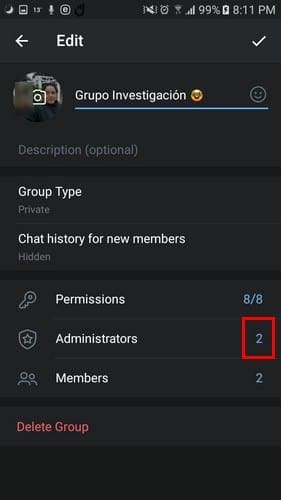
If you want to check if Telegram has saved your changes go to the Administrators option and the number of administrators you added will be labeled to the right.
Conclusion
With great power comes great responsibility. Hopefully, the new Telegram group will use his or her power wisely. What made you decide to transfer your ownership of the group? Share your experience in the comments below.




if owner left, how can we be owner or be admin to do control of group?
I want create ownership but always again and again showing
Logged in on this device more than 24 hours ago.
But after 24 your ago show always
I am leaving my job. So, I transferred ownership of the group to the Head of the company.
if owner left, how can we be owner or be admin to do control of group?
How to contact Telegram support
How to change group ownership in telegram group ( other way of two step verification)?
I think you’ll have to contact Telegram support for that one Niza.
What if the owner of the group passed the group to me and I can’t add other admin which I wanted to, how to solve the problem?
What if the owner deleted his account without passing ownership? Can an admin get ownership of he got all the permissions?
I make a small group the. I deactivate my account. Then i came back i joins the group but i want my admin status back. No one is admin in my group so plz help
if owner left, how can we be owner or be admin to do control of group?
Since our group owner have not online long long time ago, Her account was deleted.
How can i change the telegram group owner?
A girl whom i loved with my whole heart is now telling me to leave telegram but i have some important groups which i don’t want to delete so i am transferring the group on my other number.
is all this step apply for supergroup?