

You want to do some brain training, and you decide to start playing Words with Friends. But, you realize that your vocabulary is not as extensive as you first thought. You make it a goal to expand your vocabulary, but does that mean that you have to lose every Words with Friends game until then? No, there are ways to avoid humiliation when playing and get a little help in the process.
It’s up to you if you only use it when you’re losing big or from the very beginning. Besides using this helpful tool, there are tips to keep in mind to win the game. Keep reading to see what tips you can start using to avoid hearing your friends saying you really need to learn new words.
How to Always Play New Words in Words with Friends
You’re challenged to a game at Words with Friends. You accept thinking that you’ll have a fair chance, but the other competitor ads words you didn’t even know existed. You can always try Word Finder.
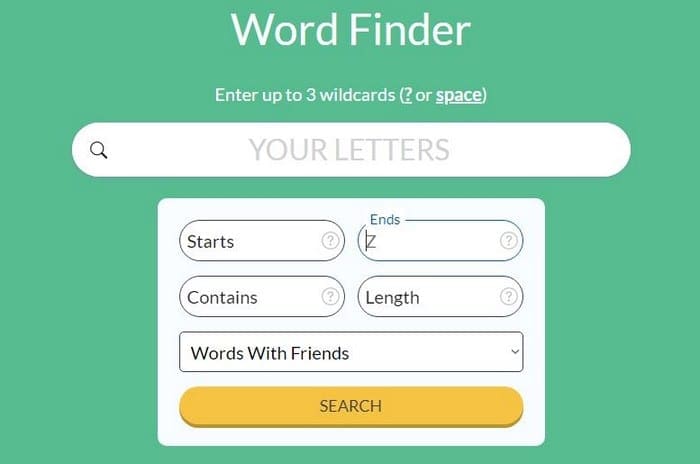
Where it says, ” Your Letters,” you need to type the letter you have to play with in your match. If your new word needs to be specific, you can use the option right below where you typed your letters. Type the letters your words need to start and end with. The contains option is beneficial. If the letters in the word need to be in a specific position, this is the option to use. If you place the cursor over the question mark, the site will give you examples. The length option does just that. If your words need to be a certain length, type the number of letters it needs to have there. The word finder also works with Scrabble as well. Click on the Scrabble option to find words for that game.
Other Options
If you don’t want to be humiliated and need a little help when you play, there are some options you can use. You can use Words with Friends Cheat, Lexical Words Finder, and Scrabble Words Finder to be used for Words with Friends.
Use the Word with Friends Opportunities
Instead of stressing out on what word to use, don’t forget about the simple things such as adding an S to a word your opponent added. You never know; it might give you a triple word score.
Never underestimate the small words. There are words such as qi that can give you some good points. If you’re not sure if the one you’re going to add is a real word, try it anyway, there’s no penalty for adding words that don’t exist.
Sure, you could cross a word. It could give you some good points, but always use the last letter of a word to touch another word in as many places as possible. You get the extra points for that, while your opponent doesn’t.

Conclusion
It’s no fun when you keep losing at your favorite game. You want to win fair and square, but you keep losing. By keeping in mind the tips mentioned in the article, you won’t lose as much or at all at Words with Friends. How often will you use these tips and tools to lose? Let me know in the comments below.




Hey Judy,
Few years ago I read some of your articles at knowtechie and usually found them helpful ! ( now I’m more I efficient in android devices usage :)
Today, I’m crossing you again “as a fanatic of word games challenges”, and it was while searching for some new tricks to lose “less” on words with friends. I’m posting this comment to share with you a lil remark :
I used too many unscramblers and never noticed such a difference btw that site and the others, they seems to be using the same database. However, I’ve noticed that it is the only unscrambler website who’s not serving annoying ads.
I can name a few additionnal resources that I remember such dailynytcrossword.com, for nyt crossword help and I think a website for w w friends dot something. Anyway, I think that’s the big advantage of word.tips
There are many games that you mind more stronger and healthy. Once I play word game with friends they make me shocked by words vocabulary. And here I found that. they were using tool: https://unscrambles.net/
This is amazing tool.
We can get the house tomorrow to
We will get a hold of him and I
I don’t have a phone back in and back on phone and I’m
I just got a new car from going to my office
I’m not doing a job now