

Messaging apps such as WhatsApp have their advantages. You can send all the text messages, videos, and voice messages you want for free.
But, there are times when the messages you send are ignored by the recipient in some way. Whether they forgot to answer your message or deliberately ignored it, you need an answer. Why not bombard them with the same message until they reply?
How to Send the Same Message Repeatedly in a WhatsApp Chat
To get the other person’s attention by sending the same message over and over again, you’re going to need to install an app called Text Repeater.
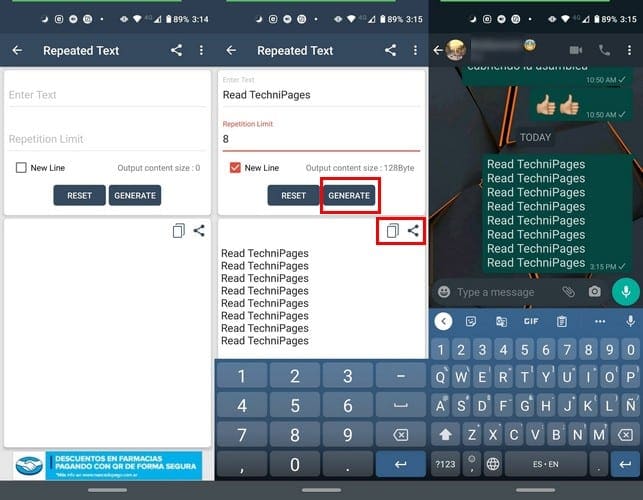
When you first open the app, the option to repeated a text will be at the top. After selecting this option, type the message you want to repeated on the first line and how many times you want to repeat the text in the second line.
If you want a new line between each repeated text, make sure to check the New Line box. By not checking the option, it’ll make it a little more challenging to see where the text repeats itself.
To start over, choose on the Reset option, but if you’re sure you’ve written what you want to repeat, tap on the Generate option. Below these options, you’ll see a preview of what your repeated text will look like.
When it comes to sharing, you have two options. You can use the share option and choose an app you already have on your device to share. Or, you can use the copy option and paste it elsewhere.
The app does more than just create repeated text. In the app’s main page, you can use other features such as create random text, which is excellent if you want to prank someone with text that makes no sense or random emojis.

If you’re not happy with the emojis you see, tap on the Generate button as many times as you want to create a fresh batch of random emojis.
Other options you can choose from are Repeated Letters, Crazy Text, ASCII Emoticons, and Blank Message. This last option is also a great option if you want to prank your friends. Receiving blank WhatsApp messages can be quite annoying, and it will make your friend think that their device might have a virus.
Conclusion
The next time you have some extra time on your hands and feel like playing a prank on someone, you know this app has some options you can use. Which option are you going to use first?


Hello, thanks for sharing but my understanding is that this is a technique to repeat a same text multiple times in a single message and not multiple times a same message. Huge difference…