Skip to content
LogoTechnipages
technipages logo
  • Topics
        • Android
        • Browsers
        • Gaming
        • Hardware
        • Internet
        • iPhone
        • Linux
        • macOS
        • Office
        • Reviews
        • Software
        • Windows
        • Definitions
  • Product Reviews
  • Downloads
  • About

Google Photos: How to Create an Album Based on Someone’s Face

Judy SanhzOctober 3, 2022 Comments (0)
delete-photos-from-phone-after-backup-to-google-photos

You can do a lot of things on Google Photos. For example, you can connect various videos or create a locked folder to keep specific pictures safe. You can easily find photos of your family and friends alone or with a particular contact. But, it’s also possible to create an album and only fill it with pictures of a specific contact.

How to Create an Album on Google Photos

Google Photos Album

You’ll need to create the album to group all the pictures of a specific contact automatically. If you’re on your computer, click on album, and at the top right, you’ll see the option to create an album.
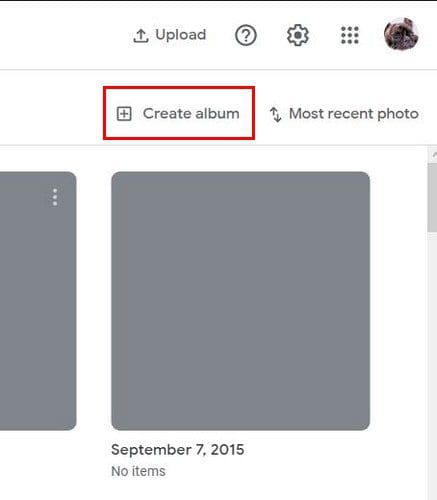
Google Photos Create Album

You’ll need to give your album a name and choose the Select people and pets option.

Select people and pets Google Photos

Choose the contact, and your pictures with that contact will start to upload. You can click the Add Photos button at the top left if you see that Google Photos missed a picture. You’ll also see a share option as well. Tap on the dots at the top right. You can delete the album, edit it, and choose Options. In this last option, you can add another face to the list, enable link sharing and have the app notify you when a photo is added.

It’ll look like the images below if you’re on your Android device.

Google Photos options

If you’re on your computer, you’ll see some options that you’ll only see on your computer. For example, when you open an album and click on the dots at the top right, you’ll see the option to Set album cover and Download all. Two options you won’t see on your Android device.
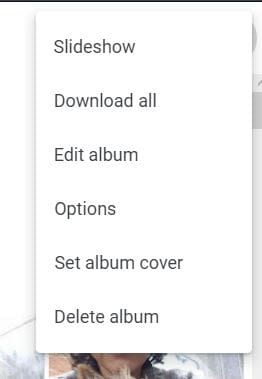
Google Photos

If you ever need to rename or delete the album, go to the Album section main page and click on the dots. You’ll see those two options there.

Conclusion

Creating an album is easy, and so is making one with pictures of your favorite person. You can create as many albums as you want and delete them after if that’s what you want to do. How many albums will you be making? Share your thought in the comments below, and don’t forget to share the article with others on social media.

Categories: Internet

Author Judy Sanhz

You Might Also Like

  • Fix Google Chrome Status_Invalid_Image_Hash Error

    Madalina DinitaInternet
  • How to Add a Friend in Discord

    Mel HawthorneInternet
  • What Is SQL Injection?

    Mel HawthorneInternet
  • What Is Protonmail and Is It Secure?

    Mel HawthorneInternet

Leave a Reply

Your email address will not be published. Required fields are marked *

This site uses Akismet to reduce spam. Learn how your comment data is processed.

300x600
Turning on Triple Touch Zoom on Android

Turning on Triple Touch Zoom on Android

How to Connect Outlook 2023 to Gmail

How to Connect Outlook 2023 to Gmail

Netflix: Change Password

Netflix: Change Password

Everything You Need to Know About WhatsApp Delete for Me

Step-by-Step Guide: How to Use WhatsApp on Your Computer

Android: Enable or Disable Background Data

Android: Enable or Disable Background Data

300x250
profile pic

The Experts Behind Technipages

My name is Mitch Bartlett. I've been working in technology for over 20 years in a wide range of tech jobs from Tech Support to Software Testing. I started this site as a technical guide for myself and it has grown into what I hope is a useful reference for all.

Learn More

300x250 2
technipages logo white
linkedin icon

Technipages is part of Guiding Tech Media, a leading digital media publisher focused on helping people figure out technology. Visit guidingtechmedia.com to learn more about our mission and team.

© 2026 Guiding Tech Media All Rights Reserved

  • About Us
  • Contact
  • Legal & Privacy

© 2026 Guiding Tech Media All Rights Reserved

Information from your device can be used to personalize your ad experience.
Do not sell my personal information.