Skip to content
LogoTechnipages
technipages logo
  • Topics
        • Android
        • Browsers
        • Gaming
        • Hardware
        • Internet
        • iPhone
        • Linux
        • macOS
        • Office
        • Reviews
        • Software
        • Windows
        • Definitions
  • Product Reviews
  • Downloads
  • About

How to Fix Skype Recording Error 0xc00d36c4

Madalina DinitaJanuary 26, 2021 Comments (0)
skype recording error 0xc00d36c4

Your media player may sometimes fail to play Skype recordings. When this happens, users often get the following error message: “This file isn’t playable. That might be because the file type is unsupported, the file extension is incorrect, or the file is corrupt. 0xc00d36c4“.

Fix Error 0xc00d36c4 on Windows 10

Download the Recording From the Web

If you’re experiencing error 0xc00d36c4 with a Skype recording you downloaded directly from the app, log in to Skype for Web. Ideally, you should be using Edge or Chrome. If you’re using a different browser, temporarily switch to Edge or Chrome while you’re downloading your Skype recordings.

If your Skype recording got corrupted, downloading the video again should fix the issue.

Use a Different Player

Try using a different media player and check if this workaround solved the problem. Maybe your player does not support the video format.

For example, if you’re using the Windows Media Player, download VLC. This versatile cross-platform media player can render almost any video format.

However, if you prefer to keep using your good old media player, download the missing codecs. One reason why your player can’t play your Skype recordings is that you’re not using compatible codecs. Don’t forget to check for updates and install the latest media player version.

Convert Your Skype Recording

Another solution is to simply convert your Skype recording to a different video format. If you already downloaded VLC on your machine, launch the media player and click on the Media menu. Select Convert/Save and select your Skype recording.
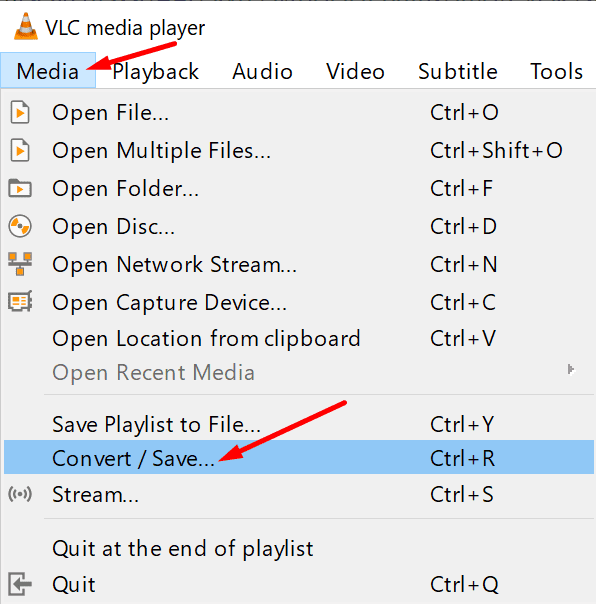
vlc convert media file

Select the video format you want to use. You can try different formats and test which one your media player can render. Converting your Skype recording to a different video format can help you fix any file corruption issues that might have occurred when you first downloaded the video.

There you go, we hope one of these three methods worked for you.

Categories: Software

Author Madalina Dinita

You Might Also Like

  • How to Always Make Microsoft Edge Open in Private Mode

    Judy SanhzSoftware
  • How To Integrate Monday.com Into Microsoft Teams

    MonaSoftware
  • How to Move the Install Folder for a Steam Game

    Mel HawthorneSoftware
  • 100+ Best Snapchat Lenses for Cool Selfies in 2023

    100+ Best Snapchat Lenses for Cool Selfies in 2023

    Martin ClarkAndroid

Leave a Reply

Your email address will not be published. Required fields are marked *

This site uses Akismet to reduce spam. Learn how your comment data is processed.

300x600
Turning on Triple Touch Zoom on Android

Turning on Triple Touch Zoom on Android

How to Connect Outlook 2023 to Gmail

How to Connect Outlook 2023 to Gmail

Netflix: Change Password

Netflix: Change Password

Everything You Need to Know About WhatsApp Delete for Me

Step-by-Step Guide: How to Use WhatsApp on Your Computer

Android: Enable or Disable Background Data

Android: Enable or Disable Background Data

300x250
profile pic

The Experts Behind Technipages

My name is Mitch Bartlett. I've been working in technology for over 20 years in a wide range of tech jobs from Tech Support to Software Testing. I started this site as a technical guide for myself and it has grown into what I hope is a useful reference for all.

Learn More

300x250 2
technipages logo white
linkedin icon

Technipages is part of Guiding Tech Media, a leading digital media publisher focused on helping people figure out technology. Visit guidingtechmedia.com to learn more about our mission and team.

© 2026 Guiding Tech Media All Rights Reserved

  • About Us
  • Contact
  • Legal & Privacy

© 2026 Guiding Tech Media All Rights Reserved

Information from your device can be used to personalize your ad experience.
Do not sell my personal information.