Skip to content
LogoTechnipages
technipages logo
  • Topics
        • Android
        • Browsers
        • Gaming
        • Hardware
        • Internet
        • iPhone
        • Linux
        • macOS
        • Office
        • Reviews
        • Software
        • Windows
        • Definitions
  • Product Reviews
  • Downloads
  • About

How to Access Your Facebook Data

Mel HawthorneDecember 11, 2019 Comments (0)
Facebook Header

In the information age, there’s no question that a lot of places have a lot of information about us, and Facebook is no exception. If you want to know exactly what sort of info Facebook has on you, you can find out relatively easily – you can both view and download all of the info Facebook has on you straight from your profile!

In order to get this info, you need to be logged in to your profile. Click on the drop-down arrow in the top right corner and click on Settings.

The menu dropdown at the top

The setting you want is on the left-hand side – it’s labelled Your Facebook Information. Here, you have several options all pertaining to what Facebook knows about you.

Your Facebook information top-level menu option

You can access the information Facebook has by category, you can view an activity log, you can download a collection of all of the data the company has, and you can choose to deactivate and delete your account, both temporarily and permanently.

If you want to learn more about your data, click on Managing your Information. You’ll be taken to the Help Centre, where you’ll be able to narrow down exactly what you’re interested in.
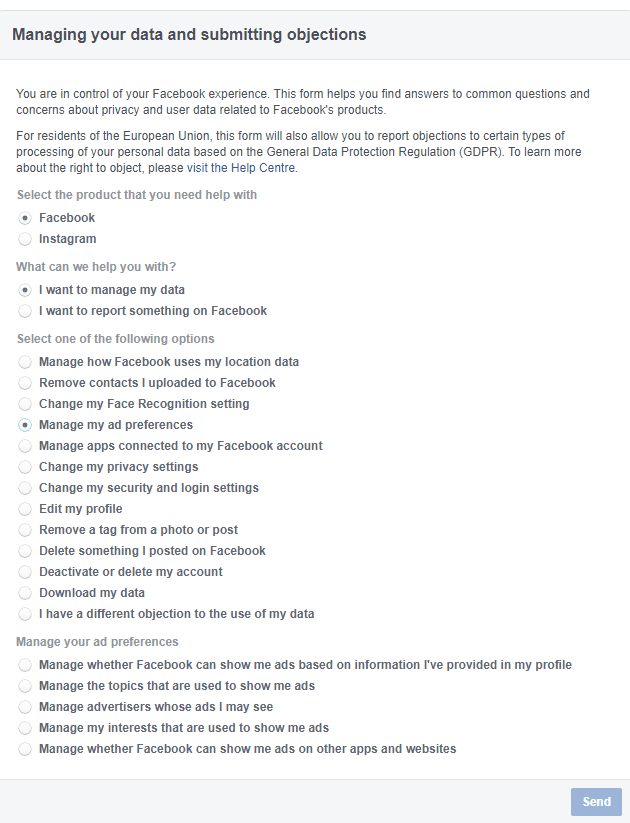
A filled out example of the Help Centre option tree

Tips: If you ever want to find a post you liked or interacted with but you can’t find it in your feed, you can use the Activity log to find it. It lists reacts, comments and more by date. It stretches back across your entire account history! So, whether you just want to find a cool video or unlike a post you no longer agree with, this feed is the way to go.

When using the Download your information button, you can be as general or specific as you’d like – Facebook has various filters you can use to narrow down the info that you want – posts, likes, messages and events – there are dozens of options, and you can request data by dates, and even decide what format you’d like the data to be in.
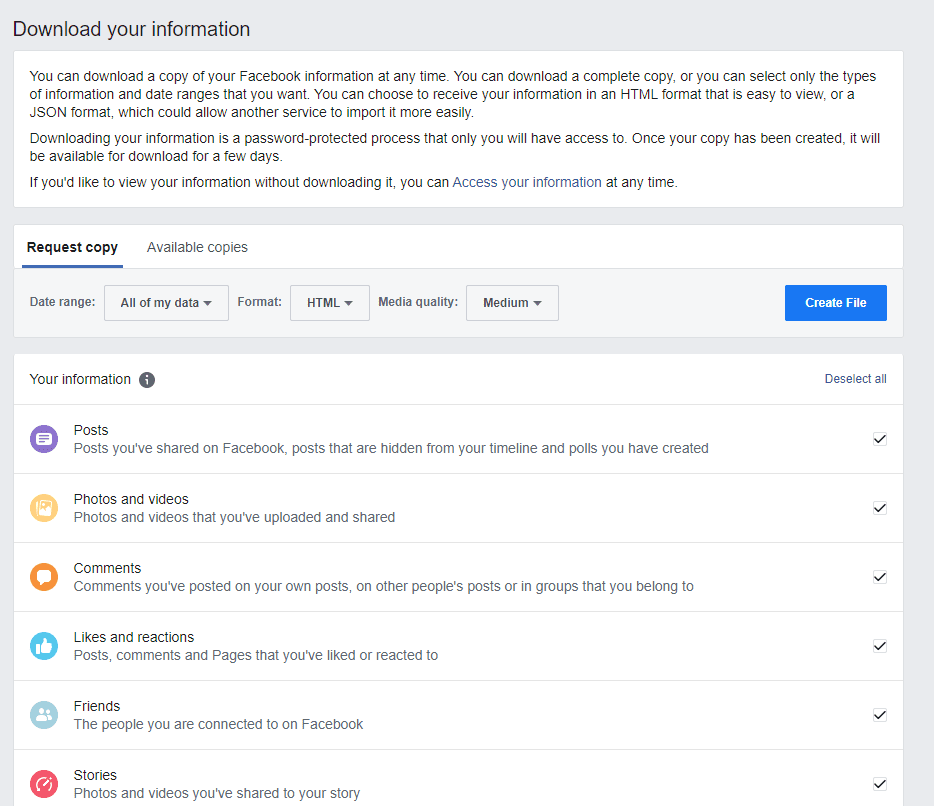
The Download Your Info section with its options

When you are happy with your selection, you can create the file and you’ll be able to download it for a few days – after that, it expires, and you will have to create a new copy. Always keep your downloaded data secure – it contains private information, so please don’t share it carelessly!

Categories: Internet

Author Mel Hawthorne

You Might Also Like

  • Facebook Header

    How to Delete Facebook Status

    Mitch BartlettInternet
  • Slack: How to Manage the Workspace Members

    Mel HawthorneInternet
  • Dropbox: How to Change Your Display Name

    Mel HawthorneInternet
  • Dropbox: How to Disable Emails Warning You That You’re Running out of Space

    Mel HawthorneInternet

Leave a Reply

Your email address will not be published. Required fields are marked *

This site uses Akismet to reduce spam. Learn how your comment data is processed.

300x600
Turning on Triple Touch Zoom on Android

Turning on Triple Touch Zoom on Android

How to Connect Outlook 2023 to Gmail

How to Connect Outlook 2023 to Gmail

Netflix: Change Password

Netflix: Change Password

Everything You Need to Know About WhatsApp Delete for Me

Step-by-Step Guide: How to Use WhatsApp on Your Computer

Android: Enable or Disable Background Data

Android: Enable or Disable Background Data

300x250
profile pic

The Experts Behind Technipages

My name is Mitch Bartlett. I've been working in technology for over 20 years in a wide range of tech jobs from Tech Support to Software Testing. I started this site as a technical guide for myself and it has grown into what I hope is a useful reference for all.

Learn More

300x250 2
technipages logo white
linkedin icon

Technipages is part of Guiding Tech Media, a leading digital media publisher focused on helping people figure out technology. Visit guidingtechmedia.com to learn more about our mission and team.

© 2026 Guiding Tech Media All Rights Reserved

  • About Us
  • Contact
  • Legal & Privacy

© 2026 Guiding Tech Media All Rights Reserved

Information from your device can be used to personalize your ad experience.
Do not sell my personal information.