Skip to content
LogoTechnipages
technipages logo
  • Topics
        • Android
        • Browsers
        • Gaming
        • Hardware
        • Internet
        • iPhone
        • Linux
        • macOS
        • Office
        • Reviews
        • Software
        • Windows
        • Definitions
  • Product Reviews
  • Downloads
  • About

XBox 360: Find MAC Address

Mitch BartlettNovember 10, 2018 Comments (3)
XBox 360 Basic Settings

If you need to find the MAC Address to your XBox 360, you can use these steps to locate it within the system’s menus.

  1. Select “System settings“.
  2. Select “Network settings“.
  3. Connect to a network that isn’t using a MAC address filter. Use any network temporarily if you have to. If you don’t connect to a network of some kind, the MAC Address will not display.
  4. Go back into your network and select “Configure Network“.
  5. Select the “Additional Settings” tab.
    XBox 360 Basic Settings
  6. Bring down your cursor on “Advanced Settings”, “Host Name“, “Alternate MAC Address” and select it.
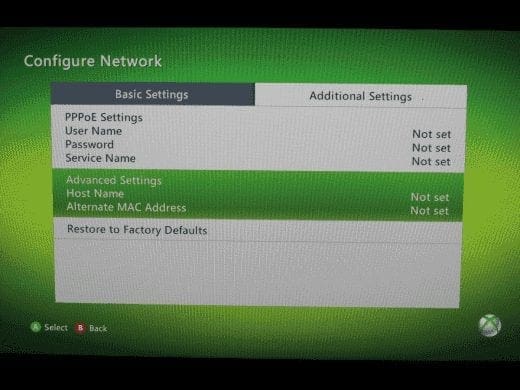
    XBox 360 Additional Settings Screen

The MAC Address for your Xbox 360 is displayed on the left side of the screen in a format like 12AB34CD56EF. When you go to provide this information in another system, you may have to type it in the normal format of 12:AB:34:CD:56:EF. Select “Done” when you’re finished.

XBox 360 MAC Address Screen

Note: You don’t have to worry about the Alternate MAC Address in most cases. This is only used if your Internet connection is accessed through your computer instead of a router.

Thanks to Chris Edwards for help in updating this post.
Categories: Gaming

Author Mitch Bartlett

My name is Mitch Bartlett. I've been working in technology for over 20 years in a wide range of tech jobs from Tech Support to Software Testing. I started this site as a technical guide for myself and it has grown into what I hope is a useful reference for all. Mitch's Favorite Gear ATX Graphics Card CanaKit Raspberry Pi 3

You Might Also Like

  • Razer Synapse 3.0: How to Configure a Custom Keyboard Backlighting Color Scheme

    Mel HawthorneGaming
  • Oculus

    VR Oculus Quest 2: How to Reset the Direction You’re Facing

    Mel HawthorneGaming
  • Oculus

    VR Oculus Quest 2: How to Reset Your Headset

    Mel HawthorneGaming
  • How to Connect Bluetooth Headphones to Steam Deck

    Andrew MyrickGaming

Comments

  1. Lena says:
    February 15, 2017 at 9:58 pm

    Thank you so much. I never would have figured this out…

  2. trueno74 says:
    December 24, 2015 at 11:17 am

    Thanks buddy!

  3. Steven Holland says:
    October 7, 2015 at 4:51 pm

    Thank you so much for your help

Leave a Reply

Your email address will not be published. Required fields are marked *

This site uses Akismet to reduce spam. Learn how your comment data is processed.

300x600
Turning on Triple Touch Zoom on Android

Turning on Triple Touch Zoom on Android

How to Connect Outlook 2023 to Gmail

How to Connect Outlook 2023 to Gmail

Netflix: Change Password

Netflix: Change Password

Everything You Need to Know About WhatsApp Delete for Me

Step-by-Step Guide: How to Use WhatsApp on Your Computer

Android: Enable or Disable Background Data

Android: Enable or Disable Background Data

300x250
profile pic

The Experts Behind Technipages

My name is Mitch Bartlett. I've been working in technology for over 20 years in a wide range of tech jobs from Tech Support to Software Testing. I started this site as a technical guide for myself and it has grown into what I hope is a useful reference for all.

Learn More

300x250 2
technipages logo white
linkedin icon

Technipages is part of Guiding Tech Media, a leading digital media publisher focused on helping people figure out technology. Visit guidingtechmedia.com to learn more about our mission and team.

© 2026 Guiding Tech Media All Rights Reserved

  • About Us
  • Contact
  • Legal & Privacy

© 2026 Guiding Tech Media All Rights Reserved

Information from your device can be used to personalize your ad experience.
Do not sell my personal information.