
With all of the features available on Android devices these days, it’s becoming more common for people to exceed their data cap on their wireless plan. It leaves many people wondering why their Android us using so much data. Don’t worry though. We can help you lower your data usage and get it under control with this tutorial. Just follow these steps.
1. Connect to Wi-Fi Whenever Available


This may seem like a no-brainer, but I know plenty of Android users who aren’t aware of when they are connected to a Wi-Fi network and when they aren’t. Set your Android up on your home and work Wi-Fi networks if available. Connect to available Wi-Fi networks when you’re at restaurants, bars, or any other business that supplies Wi-Fi. Doing so will prevent your Android from using so much data on your wireless plan and as a bonus will save precious battery power.
2. Check Data Usage in Settings

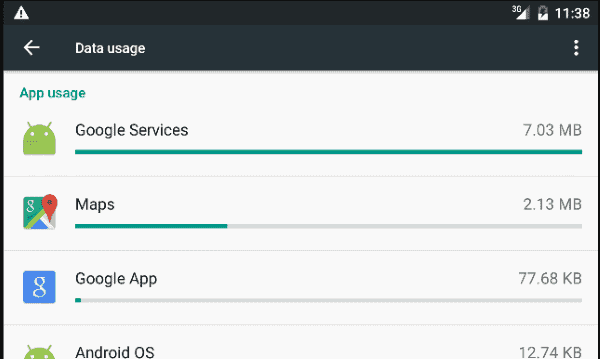
Check to see which apps are using data. On many newer Android devices, you can go to “Settings” > “Data Usage” > “Cellular data usage“, then scroll down to see which apps are using the most data. Once you’ve identified the apps that are using your data, explore the settings of each app and see if there are any settings you can disable to prevent data over your wireless provider connection. You could also uninstall the app altogether if you have no need for it.
Check Social Apps


Social media apps tend to use the most data if setup with certain configurations. The Google+ app seems to be a major data eater for many Android users these days with it’s “Auto Backup” feature that automatically uploads every photo and video you take to Google+. Facebook is another app that can tax your battery by constantly displaying notifications.
Check the “Settings” section within all your social apps and ensure that nothing is set to automatically upload your stuff, or at least set them to only upload when connected to a Wi-Fi network. Set the intervals of your apps to only sync data every few hours instead of every 15 minutes.
Limit Viewing Photos & Videos


If you’re repeatedly looking through photos and videos online, it will eat away at your monthly data allocation. Try to keep your visits to Facebook, Pinterest, Instagram, and Twitter to a minimum while on your wireless data network and save it for when you’re on Wi-Fi.
Check Data Syncing Intervals


How often do you need your data to refresh on your Android? Can you live without updated data for a few hours in some instances? If your calendar, contacts, and email sync every 15 minutes, it can really drain your data. Have a look under “Settings” > “Accounts” and set your email, calendar, and contact apps to sync data every few hours or set them to only sync when connected to Wi-Fi.
Messaging


There are a myriad of messaging apps available these days. Snapchat and Facebook Messenger are the most commonly used messaging apps. These apps constantly are sending and receiving data back and forth. It can add up to a lot after you and a friend swap a few photos and videos back and forth a few times.
Keep messaging to a minimum while you’re not connected to Wi-Fi if you’re running into data cap issues. More importantly, disable any messaging services that you might not be using.
Disable Auto Update Apps
This one is a big one. Make sure that the Google Play app is not set to automatically update your apps while on the wireless provider’s network. Open Google Play, then tap the menu in the upper-left corner. Select “Settings” and ensure the “Auto-update apps” setting is set to “Do not auto-update apps” or “Auto-update apps over Wi-Fi only“.
I hope this list helps you on your way to limiting the data use on your wireless plan. Have anything to add? Hit me up in the comments section.



I was going to ask a question yet noticed none of the others had been answered. Why
is that?
thanks
I found one time ago that video on the phone is a data hog. So I avoid YouTube. Unfortunately news sites are running video. There used to be a setting in browser to not play video or even images while browsing. This feature is gone on browsers now..when we need it most.
Can’t see a publish date for this article!!!!!
Consider this information out of date due to various system software updates.
Yes, it’s good to get it off my chest and it’s good that y’all know we’re all about to blow but we will not let it go. Do you want our data come Rainshine or snow?
Let US know!
I have an Alcatel 1B phone. I have 6gb free each month,I appear to have used nearly all of it up and was wondering why this is? I’m a novice with mobile phones. Also I have deleted loads of apps that I won’t use but there still updating?
I do turn off the wifi hotspot setting unless I specifically want to use wifi. When your phone connects to wifi hotspots it does so in an insecure way and others can hack into your phone.
I only used 6 GB in a month watching YouTube now I use 14 it’s only half of a month and I am not watching YouTube they say it’s Google that’s taking my data.
The only thing different is I used to have unlimited data and then I switched back to 16 GB no it’s all used up
No I am a first time user and I don’t understand how to cut down on the user apps I am getting warnings that I am using too much data.
I have a Accatel_5002R
Device Service Number is:
ZLIRLI7XK59YLGM
Build Number is: GZDDUADO
Warranty Date is: 10/1/2021
Android Version is: 10
I am having Storage Space Issues. And have no Idea he to get it fixed??
Can some body Please help me with this situation!!!!
My phone is acting wierd. I can’t answer it when it rings. The screen stays blsck also both my apps are not wokknb an they using way rk days
I have an alcatel and everytime I switch off background data or delete apps I don’t need it still gets rid of so much, It has only been about a week and somehow I’ve already used 14GB, I don’t understand and I’ve tried everything to fix it but nothing is working.
I have turned on data saver for all but three apps. I have turned background app refresh off for all apps.
When I turn off my wifi, ALL apps still work with mobile data.
Why is this?
When I use youtube to watch video it over soon though I use 230p
It gets over soon
Yaaa.. Really it is very helpful and workable …..Thankyou
It really is a form of thievery when all you want to do is talk and be able to send messages and pictures. My sister-in-law does not have internet, and she can lose over 200 megs in one night just recharging her phone. By the middle of the month, all of her 1G data is consumed by the powers that be when she has used none of it herself; and she cannot do anything except send messages and talk.
Koodo Mobile self serve has only upgrade rate plans so two choises $3 per month Data blocker or $10 for 2G use ……WTF…
They do not notice any this happens….
Dear sir magnet application consumption excess data it’s a particular app that consumes quickly my data
Cool! I shall try your method
I have a OnePlus 3 which now has Android 9. There is a way to see the data speed right on the notification bar with this version. It is simply insane… Data is being used all the time, and lots of it. When on a weak signal, I now understand why phones die so quickly. Google assumes that I’m on Broadway surrounded by towers.
Even with only one app allowed to go in the background, Google Play Services, data continues to be consumed. It’s more than a simple heartbeat.
Back a few versions ago, putting a phone in 3G you would see H+ show up when data was being used and 3G when it wasn’t. Now, data is continually being used.
I used to have a very small data plan and I could manage it well. Now, I have a big enough data plan for all this chit-chat, but having to charge my phone just because it kept updating God-knows-what is stupid. We’ve lost all control to Google.
I cant do much of anything because of this data cap. So I turned off the mobile data now I have no internet connection. I hate this phone!
I just switched from boost mobile to metro pcs two weeks ago. I notice the data usage on my phone increase a lot on metro pcs when compared to the boost mobile. I don’t know it’s because the carrier or the phone change from android 6 to android 9.
Hi kim, i have the same issue as yours, have you found any solution for that problem?
I am having the same issues. I have turned cell data off, I have disabled background data on every app, etc. I also have noticed the app that is using the most data is “removed apps or users”. I have disabled all apps besides messaging, phone, etc. I no longer use internet via my phone, I no longer use Youtube or social media or messaging via my phone. I have activated “data saver”. Still using a lot of data and there seems to be no known logical explanation.
When I open cellular data it immediately take my money on during internet collection so please what shall ido
Very helpful and clear instructions. Thank you very much.
According to AT&T, my phone burns thru 1GB PER HOUR EVEN WHEN MY PHONE IS OFF. I have nearly everything possible disabled and rarely or sparingly use only a few apps for a few mins a day. No streaming, no notif’s, no auto-anything, rarely upload or download images. The phone settings data usage thingy do not reflect what AT&T says my phone is using per hour. (Yes per hour, not per day or per month.) I get constant warnings from AT&T regarding my data use & I have no idea why it’s using so much.