Skip to content
LogoTechnipages
technipages logo
  • Topics
        • Android
        • Browsers
        • Gaming
        • Hardware
        • Internet
        • iPhone
        • Linux
        • macOS
        • Office
        • Reviews
        • Software
        • Windows
        • Definitions
  • Product Reviews
  • Downloads
  • About

What is an Infinite Loop Error on a Computer?

Madalina DinitaJanuary 11, 2021 Comments (0)

An infinite loop error describes a technical glitch that forces your computer to repeat the same actions over and over again. For example, you just restarted your device after you installed the latest OS version. But instead of booting up, your computer keeps on restarting. And it seems that nothing can end that unusual behavior. In other words, your computer is stuck in an infinite restart loop.

The annoying Blue Screen of Death issue or BSoD is another example of infinite loop errors on Windows 10.

What Causes Infinite Loop Errors?

Infinite loop issues often occur after users update the OS, install a new program on their computers, or update existing programs and apps. Simply, put, the new program files or system files fail to replace the old ones. Or, if you will, old and new files conflict leading to infinite loop errors.

How to Troubleshoot Infinite Loop Issues on Windows 10

Disconnect External Devices

The first step consists of disconnecting all the peripherals connected to your computer. That includes your mouse, keyboard, external storage devices, etc. If the problem persists, go to the next solution.

Use Advanced Boot Options

If you can access the Power option before the machine restarts, press the Shift key and click on Power → Restart. In this manner, you can restart the computer and enter Advanced Boot Options.troubleshoot advanced options windows 10
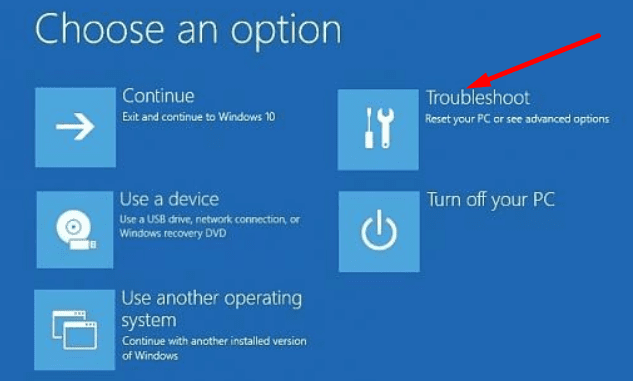
Then, navigate to the Troubleshoot section → Advanced → Startup. Hit the Restart button. Then press F5 to login with safe mode with networking.

Uninstall recent updates or remove the problematic programs that might be causing the infinite loop problem. If all this fails, go back to Advanced settings and press the F7 key to disable Driver signature enforcement. disable driver signature enforcement windows 10Many users confirmed the infinite loop errors stopped after turning off the driver signature feature.

Categories: Windows

Author Madalina Dinita

You Might Also Like

  • Windows: Cannot Connect to Certain Web Sites

    Mitch BartlettWindows
  • windows-system-registry-file-missing-or-contains-errors

    Fix: System Registry File Is Missing or Contains Errors

    Madalina DinitaWindows
  • roll-back-from-windows-11-to-windows-10

    How to Downgrade from Windows 11 to Windows 10

    Madalina DinitaWindows
  • How to Fix Windows Printer Error 0x0000011b

    How to Fix Windows Printer Error 0x0000011b

    Madalina DinitaWindows

Leave a Reply

Your email address will not be published. Required fields are marked *

This site uses Akismet to reduce spam. Learn how your comment data is processed.

300x600
Turning on Triple Touch Zoom on Android

Turning on Triple Touch Zoom on Android

How to Connect Outlook 2023 to Gmail

How to Connect Outlook 2023 to Gmail

Netflix: Change Password

Netflix: Change Password

Everything You Need to Know About WhatsApp Delete for Me

Step-by-Step Guide: How to Use WhatsApp on Your Computer

Android: Enable or Disable Background Data

Android: Enable or Disable Background Data

300x250
profile pic

The Experts Behind Technipages

My name is Mitch Bartlett. I've been working in technology for over 20 years in a wide range of tech jobs from Tech Support to Software Testing. I started this site as a technical guide for myself and it has grown into what I hope is a useful reference for all.

Learn More

300x250 2
technipages logo white
linkedin icon

Technipages is part of Guiding Tech Media, a leading digital media publisher focused on helping people figure out technology. Visit guidingtechmedia.com to learn more about our mission and team.

© 2026 Guiding Tech Media All Rights Reserved

  • About Us
  • Contact
  • Legal & Privacy

© 2026 Guiding Tech Media All Rights Reserved

Information from your device can be used to personalize your ad experience.
Do not sell my personal information.