Skip to content
LogoTechnipages
technipages logo
  • Topics
        • Android
        • Browsers
        • Gaming
        • Hardware
        • Internet
        • iPhone
        • Linux
        • macOS
        • Office
        • Reviews
        • Software
        • Windows
        • Definitions
  • Product Reviews
  • Downloads
  • About

Twitter: How to Turn Off DMs

Mitch BartlettDecember 2, 2022 Comments (1)
How to delete your Twitter account hero

In this post we will cover how to turn off DMs (Direct Messages) on Twitter.

Twitter doesn’t provide a way to stop DMs from everybody. However, it does have a feature to stop DMs from people you do not follow.

  1. Login to your Twitter account or open the app.
  2. Desktop browser users select More ⋯. Twitter app users select your profile picture located at the upper-right portion of the screen.
  3. Select Settings and privacy > Privacy and safety > Direct Messages.
  4. Uncheck the Allow message requests from everyone box.
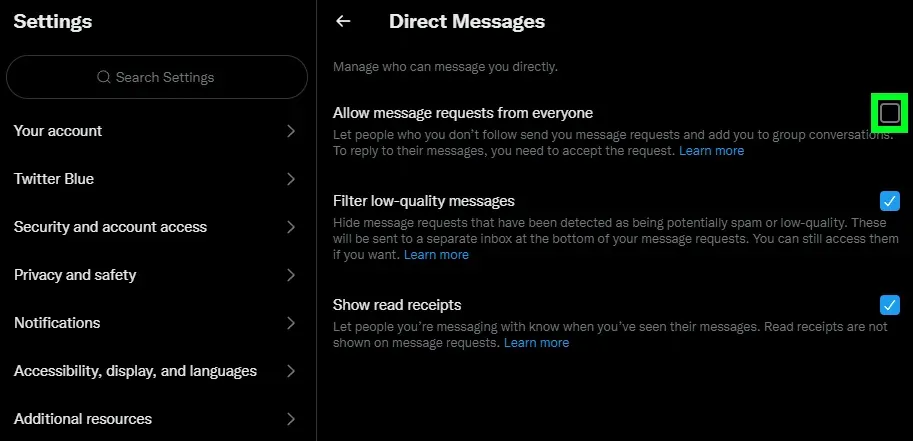
You’ll still be able to get DMs from people who follow you.

That’s how you stop direct messages on Twitter. Have questions? Drop one below in the comments section.

Categories: Hardware

Author Mitch Bartlett

My name is Mitch Bartlett. I've been working in technology for over 20 years in a wide range of tech jobs from Tech Support to Software Testing. I started this site as a technical guide for myself and it has grown into what I hope is a useful reference for all. Mitch's Favorite Gear ATX Graphics Card CanaKit Raspberry Pi 3

You Might Also Like

  • Printer Header

    How to Scan on Canon MX492

    Mitch BartlettHardware
  • 3D printing header

    3D Printing Basics: Signs your Print Head or Bed Temperature is Wrong

    Mel HawthorneHardware
  • 3D printing header

    3D Printing Basics: Making Waterproof Prints

    Mel HawthorneHardware

Comments

  1. Skm says:
    May 1, 2023 at 10:09 am

    I want to disable DM from any users. Why there is a No setting for this?

Leave a Reply

Your email address will not be published. Required fields are marked *

This site uses Akismet to reduce spam. Learn how your comment data is processed.

300x600
Turning on Triple Touch Zoom on Android

Turning on Triple Touch Zoom on Android

How to Connect Outlook 2023 to Gmail

How to Connect Outlook 2023 to Gmail

Netflix: Change Password

Netflix: Change Password

Everything You Need to Know About WhatsApp Delete for Me

Step-by-Step Guide: How to Use WhatsApp on Your Computer

Android: Enable or Disable Background Data

Android: Enable or Disable Background Data

300x250
profile pic

The Experts Behind Technipages

My name is Mitch Bartlett. I've been working in technology for over 20 years in a wide range of tech jobs from Tech Support to Software Testing. I started this site as a technical guide for myself and it has grown into what I hope is a useful reference for all.

Learn More

300x250 2
technipages logo white
linkedin icon

Technipages is part of Guiding Tech Media, a leading digital media publisher focused on helping people figure out technology. Visit guidingtechmedia.com to learn more about our mission and team.

© 2026 Guiding Tech Media All Rights Reserved

  • About Us
  • Contact
  • Legal & Privacy

© 2026 Guiding Tech Media All Rights Reserved

Information from your device can be used to personalize your ad experience.
Do not sell my personal information.