

If Roku fails to display channels in full screen, and you only see a quadrant in the upper corner or in the middle of the screen, keep on reading this guide to learn why the device is not displaying your channels properly.
How to Fix Roku Full-Screen Issues
Check your display settings
One frequent cause of this issue is that you did not set up the correct resolution and frame rate settings on your device.
If you’re using customized settings, go back to auto-detect mode. This allows Roku to automatically detect the correct resolution and frame rate settings that your TV supports.
- Take your Roku remote and press the Home button
- Select Settings → Display type
- Choose Auto-detect and let Roku analyze your HDMI connection

- There are two possible results:
- Roku detects your TV display type is supported
- The device is unable to detect your TV configuration and throws an error message that you can choose to ignore and force the connection.
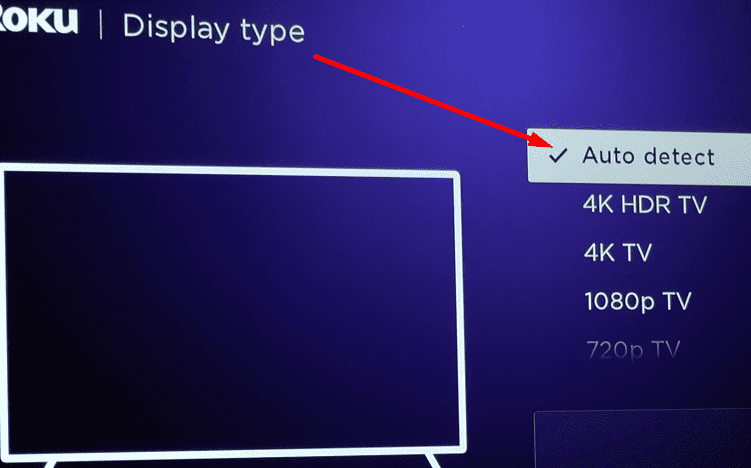
In most cases, Roku should be able to detect the capabilities of your TV. Enabling the auto-detect feature should be enough to solve this problem for most users.
Check your HDMI connection
Not being able to watch full-screen channels on Roku may be because the signal that your TV is getting is not strong enough.
Check your TV settings and try to optimize them. Or remove the HDMI cable, swap the ends, and reconnect them to your device.
Also, try a different HDMI input and check if you notice any improvements.
Check for updates
Installing the latest system updates may help you to fix this problem.
- Go to Settings and select System
- Then select Check for updates

- Hit the Check now button to see if there’s a new system update version pending and install it.

Factory reset the device
If nothing worked, try performing a factory reset as a last resort. Keep in mind this will clear absolutely all the data from your device. It will be as if you bought a new Roku device.
- Go to Settings → System
- Select Advanced system settings
- Choose Factory reset.
The troubleshooting solutions listed in this guide may not yield positive results for all the Roku users experiencing this annoying full-screen issue.
If the issue persists, contact Roku support and their team will assist you further.

My Roku TV, flashes on when turned on, then now picture at all. Not even one year old, who can fix it!
No, tv picture is a quarter of the size! How do i fix this issue?
My Roku tv screen is not full anymore there is black on both sides what is wrong
Can I change the font size on not just roku but all the apps too such as netlfix, Hulu, disney, so bigger pictures ? I’m still in windows Vista Era.
Not getting full screen on Sanyo ruko tv. Tried everything. Can’t get access mode either on home screen settings.
Same prob as Linda Mc. Above. The picture will not go back to Normal.
I have a new 65 inch hisense roku tv. Roku channel home is full screen, commercials play full screen, but not movies.
I’ve changed the picture ratio and my picture did not change size . As my TV is greyed out and I don’t use a cable box any suggestions
Doesn’t explain pausing a show, powering down the Roku, TV, coming back to watch, screen is about 1/4 size. You have to jump out of what you were watching, switching channels, then going back to the by original. Why the pausing, shutdown, because YouTube TV doesn’t, make that mostly doesn’t, list what you were watching to pick it back up as a resume.
Your movie is gone, then you have, if you can remember the title, search for it.
Youtubetv one of the worst UIs ever.
Turned on my roku and the display was stretched, did restart no change. I even checked my tv setting, nothing wrong there. I did all of the above, nothing I still have a stretched display.
. Tried everything listed but Roku screen still too large on my tv. Even did a factory reset. What next?
No. My roku screen on TV is small.