Skip to content
LogoTechnipages
technipages logo
  • Topics
        • Android
        • Browsers
        • Gaming
        • Hardware
        • Internet
        • iPhone
        • Linux
        • macOS
        • Office
        • Reviews
        • Software
        • Windows
        • Definitions
  • Product Reviews
  • Downloads
  • About

Telegram: How to Prevent Others from Adding You to Groups

Judy SanhzDecember 16, 2020 Comments (1)

Telegram Groups are a great way to keep in touch with a specific group of friends or family members. You get to see the funny things others post and the silly things they say to each other. But, if you don’t change up the right security settings, anyone can add you to a group without your permission.

How to Strengthen Telegram Group Security

Unless you want your phone to practically explode with group notifications, it’s best to limit who can add you to a group. Thay way, you only get group notifications for groups you actually care about.

To stop anyone from adding you to a Telegram group without asking you first, go to:

  • Settings (tap on the three-lined menu)
  • Privacy and Security
  • Groups

Once you’re in the groups’ section, you can choose to have only your contacts add you to groups. If you’re not generally added to groups, but you have that one friend that creates a group for just about anything, you can make exceptions.

Below, you’ll see the exceptions section. If you decided that only your contacts can add you to groups, you want to blacklist that one friend. To do that, tap on the Never allow option and choose that contact. When you go back to the group’s section, you’ll see how many users you’ve added to the never allow list.
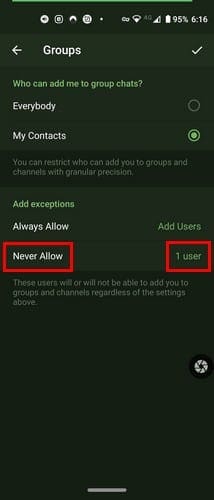
There’s also an always allow option for those contacts you trust that won’t add you to a million groups. It would be better if there was an option where no one would add to a group. Hopefully, Telegram will add that option soon. If you didn’t make the changes soon enough and someone added you to a group, you can always leave the Telegram group.

Final Thoughts

Some people may add others without asking, thinking that you can always leave if they don’t like it. But if you like to be asked first, there’s a way to make that happen; since they can’t add you, they’ll be forced to ask if they really want to add you. How do you feel about groups?


Categories: Android

Author Judy Sanhz

You Might Also Like

  • How to Stream Disney+ From Your Samsung Tablet

    MonaAndroid
  • Upcoming Flagship Phones – a First Look at the Ulefone Power Armor 14 Pro

    Mel HawthorneAndroid
  • Google Pixel 6A Announced at I/O 2022, Coming in July for Just $450

    Andrew MyrickAndroid
  • Fix-Whatsapp-View-Once-Not-Working

    WhatsApp: How to Send a Message without Typing

    Judy SanhzAndroid

Comments

  1. amin202 says:
    July 1, 2021 at 6:28 am

    What if someone from your contacts adds you to groups?

Leave a Reply

Your email address will not be published. Required fields are marked *

This site uses Akismet to reduce spam. Learn how your comment data is processed.

300x600
Turning on Triple Touch Zoom on Android

Turning on Triple Touch Zoom on Android

How to Connect Outlook 2023 to Gmail

How to Connect Outlook 2023 to Gmail

Netflix: Change Password

Netflix: Change Password

Everything You Need to Know About WhatsApp Delete for Me

Step-by-Step Guide: How to Use WhatsApp on Your Computer

Android: Enable or Disable Background Data

Android: Enable or Disable Background Data

300x250
profile pic

The Experts Behind Technipages

My name is Mitch Bartlett. I've been working in technology for over 20 years in a wide range of tech jobs from Tech Support to Software Testing. I started this site as a technical guide for myself and it has grown into what I hope is a useful reference for all.

Learn More

300x250 2
technipages logo white
linkedin icon

Technipages is part of Guiding Tech Media, a leading digital media publisher focused on helping people figure out technology. Visit guidingtechmedia.com to learn more about our mission and team.

© 2026 Guiding Tech Media All Rights Reserved

  • About Us
  • Contact
  • Legal & Privacy

© 2026 Guiding Tech Media All Rights Reserved

Information from your device can be used to personalize your ad experience.
Do not sell my personal information.