Skip to content
LogoTechnipages
technipages logo
  • Topics
        • Android
        • Browsers
        • Gaming
        • Hardware
        • Internet
        • iPhone
        • Linux
        • macOS
        • Office
        • Reviews
        • Software
        • Windows
        • Definitions
  • Product Reviews
  • Downloads
  • About

Quick Tips: How to Look Better in Zoom Meetings

Judy SanhzJune 10, 2020 Comments (0)

Who doesn’t want to look in meetings, right? That’s why you fix yourself up as much as possible, but if there’s something else you can do, you want to know.

Besides the obvious things, Zoom has a feature hidden in its settings that will help touch up your appearance in every meeting. The downside is that it’s not available on all platforms.

How to Touch Up Your Appearance on Zoom for iOS

To look better in your Zoom meetings on iOS, open the Zoom app, and sign in to your account. At the bottom left, tap on the cogwheel.
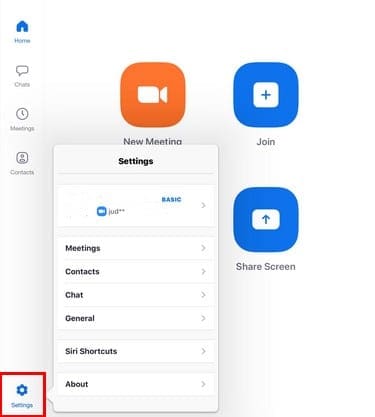
When the side window appears, tap on the Meetings option. Swipe down until you come across Touch Up My Appearance.

To see if turning on this feature is worth it, Zoom gives you a preview of how much it touches up your appearance.

How to Touch Up Your Appearance on Zoom for Windows 10 and Mac

The steps to touch up your appearance on Zoom is a little different on Windows 10. Open the Zoom app and sign in to your account.

Click on the cogwheel to go into Settings and click on the Video option on the left.

The feature may not make you look like you’re ready for the runway, but it will fix things up a bit.

Conclusion

Hopefully, shortly, Zoom will add other features to make you look better in meetings such as filters and other goodies. What would you like Zoom to add to improve your appearance? Share your ideas in the comments below.

Categories: Software

Author Judy Sanhz

You Might Also Like

  • Magnifying Glass

    What is File Extension XPS and How to Open It

    Kat ArmstrongmacOS
  • Google Sheets: Add Multiple Lines of Text in Single Cell

    Kat ArmstrongSoftware
  • microsoft teams not compatible with ipad error

    How to Create a Focus on iPadOS 15 – The Complete Guide

    Judy SanhzSoftware

Leave a Reply

Your email address will not be published. Required fields are marked *

This site uses Akismet to reduce spam. Learn how your comment data is processed.

300x600
Turning on Triple Touch Zoom on Android

Turning on Triple Touch Zoom on Android

How to Connect Outlook 2023 to Gmail

How to Connect Outlook 2023 to Gmail

Netflix: Change Password

Netflix: Change Password

Everything You Need to Know About WhatsApp Delete for Me

Step-by-Step Guide: How to Use WhatsApp on Your Computer

Android: Enable or Disable Background Data

Android: Enable or Disable Background Data

300x250
profile pic

The Experts Behind Technipages

My name is Mitch Bartlett. I've been working in technology for over 20 years in a wide range of tech jobs from Tech Support to Software Testing. I started this site as a technical guide for myself and it has grown into what I hope is a useful reference for all.

Learn More

300x250 2
technipages logo white
linkedin icon

Technipages is part of Guiding Tech Media, a leading digital media publisher focused on helping people figure out technology. Visit guidingtechmedia.com to learn more about our mission and team.

© 2026 Guiding Tech Media All Rights Reserved

  • About Us
  • Contact
  • Legal & Privacy

© 2026 Guiding Tech Media All Rights Reserved

Information from your device can be used to personalize your ad experience.
Do not sell my personal information.