Skip to content
LogoTechnipages
technipages logo
  • Topics
        • Android
        • Browsers
        • Gaming
        • Hardware
        • Internet
        • iPhone
        • Linux
        • macOS
        • Office
        • Reviews
        • Software
        • Windows
        • Definitions
  • Product Reviews
  • Downloads
  • About

Linux Mint: How to Enable Visual Accessibility Features

Mel HawthorneNovember 30, 2020 Comments (0)

If you’re visually impaired, a key feature of any operating system will be the visual accessibility features it offers. Linux Mint has a number of accessibility features, designed so it can be accessible to people with visual impairments.

To access the visual accessibility features, press the Super key, then type “Accessibility” and press enter.

Tip: The “Super” key is the name that many Linux distributions use to refer to the Windows key or the Apple “Command” key, while avoiding any risk of trademark issues.

Press the Super key, then type “Accessibility” and press enter.

“High contrast” allows you to switch between the standard display mode and a mode with larger elements and more distinct and contrasting colour changes. This effect applies system-wide, even in apps that are generally not affected by theme settings. The “Large text” option applies a text scaling that affects apps that normally don’t respect theme changes. The “Screen reader” enables a text-to-speech screen-reader.
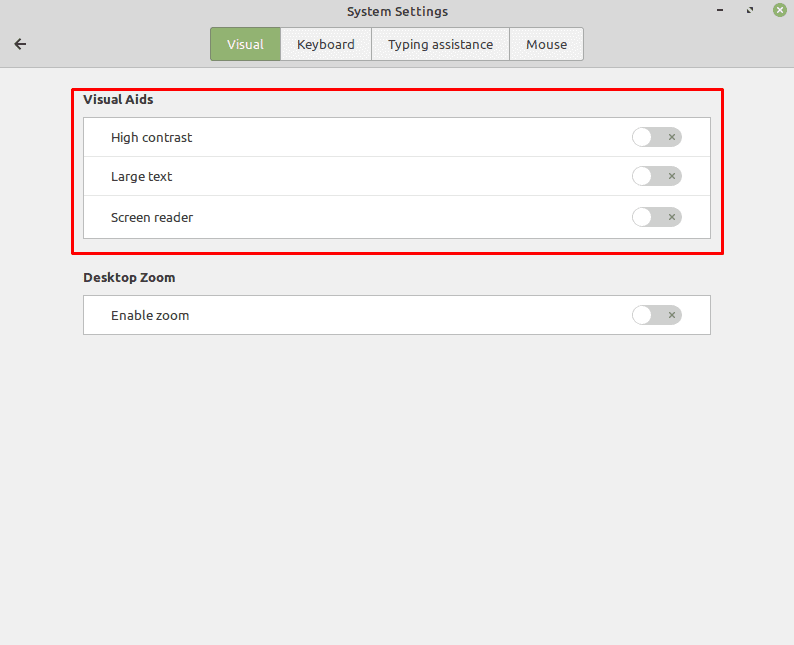
The “Visual Aids” section provides tools that can be simply toggled on and off.

“Enable zoom” enables a screen magnifier function which offers a few more settings. By default, the screen magnifier starts with a magnification of “1”, which does nothing, or the previously used setting. The “Mouse wheel modifier” allows you to configure a key you can press to then adjust the zoom level with the scroll wheel. “Scroll at screen edges” automatically scrolls the window if you push your mouse to the edge of the screen.

“Mouse tracking mode” allows you to select how the mouse moves with the screen. “Lens mode” allows you to have a small patch of the screen zoomed in, centred on the mouse pointer. “Screen position”, or “Lens shape” if Lens mode is enabled, allows you to configure the size and shape of the zoomed area.
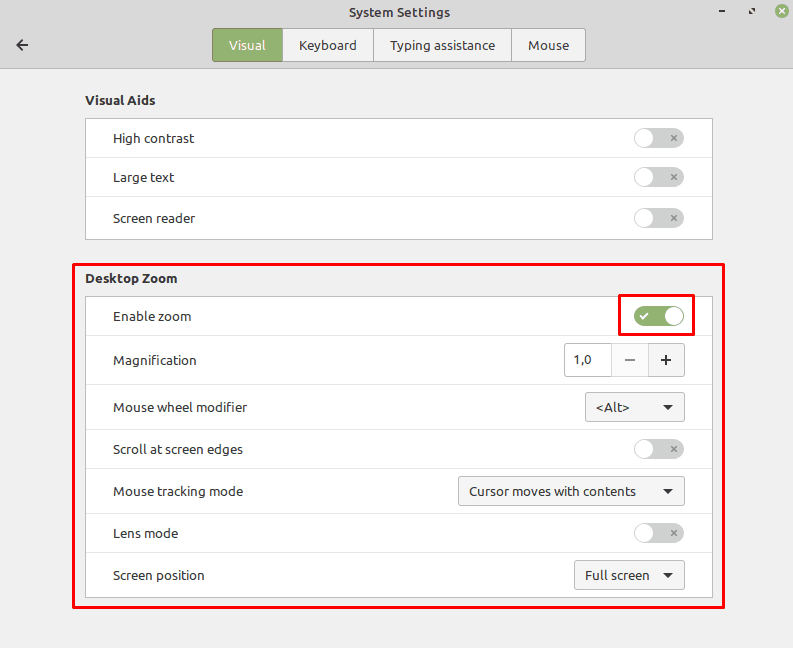
The “Desktop Zoom” feature enables a screen magnifier that has a range of configurable settings.

Categories: Software

Author Mel Hawthorne

You Might Also Like

  • Mint Logo

    How to Delete Your Mint Account

    Mel HawthorneSoftware
  • Google Photos: How to Create a Collage

    Mel HawthorneSoftware
  • Turn on Downloading for Spotify Songs

    MonaSoftware
  • Zoom

    How to Easily Create a Quiz on Zoom

    Judy SanhzSoftware

Leave a Reply

Your email address will not be published. Required fields are marked *

This site uses Akismet to reduce spam. Learn how your comment data is processed.

300x600
Turning on Triple Touch Zoom on Android

Turning on Triple Touch Zoom on Android

How to Connect Outlook 2023 to Gmail

How to Connect Outlook 2023 to Gmail

Netflix: Change Password

Netflix: Change Password

Everything You Need to Know About WhatsApp Delete for Me

Step-by-Step Guide: How to Use WhatsApp on Your Computer

Android: Enable or Disable Background Data

Android: Enable or Disable Background Data

300x250
profile pic

The Experts Behind Technipages

My name is Mitch Bartlett. I've been working in technology for over 20 years in a wide range of tech jobs from Tech Support to Software Testing. I started this site as a technical guide for myself and it has grown into what I hope is a useful reference for all.

Learn More

300x250 2
technipages logo white
linkedin icon

Technipages is part of Guiding Tech Media, a leading digital media publisher focused on helping people figure out technology. Visit guidingtechmedia.com to learn more about our mission and team.

© 2026 Guiding Tech Media All Rights Reserved

  • About Us
  • Contact
  • Legal & Privacy

© 2026 Guiding Tech Media All Rights Reserved

Information from your device can be used to personalize your ad experience.
Do not sell my personal information.