Skip to content
LogoTechnipages
technipages logo
  • Topics
        • Android
        • Browsers
        • Gaming
        • Hardware
        • Internet
        • iPhone
        • Linux
        • macOS
        • Office
        • Reviews
        • Software
        • Windows
        • Definitions
  • Product Reviews
  • Downloads
  • About

iPhone & iPad: How to Hide or Unhide Photos & Videos

Mitch BartlettOctober 13, 2020 Comments (2)

Apple introduced the ability to hide and unhide photos on your Apple iPhone or iPad. We’ll show you how it’s done with these steps.


Hide Photo or Video

  1. From the “Photos” app, navigate to the album that contains the photos or videos you wish to hide.
  2. Tap the “Select” option.
  3. Select the photos or videos you wish to hide.
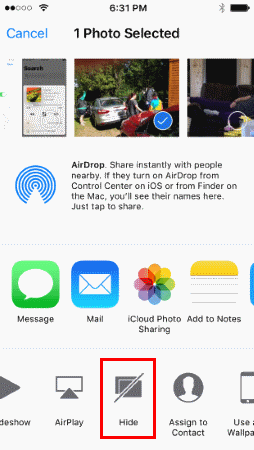
  4. Tap the  option at the bottom of the screen.
  5. Choose “Hide“.
  6. Confirm your selection by selecting “Hide Photo/Video“

When you hide an item, it is placed in an album called “Hidden”.


Unhide Photo or Video

  1. From the “Photos” app, navigate to the album that contains the photos or videos you wish to hide.
  2. Tap the “Select” option.
  3. Tap the  option at the bottom of the screen.
  4. Choose “Unhide“.

The item is then visible in the album as it was before hiding.


If you need better security for your photos or videos than a folder named “Hidden”, we recommend you try Hidden Vault App, Private Photo Vault or KeepSafe apps to hide your photos or videos behind a PIN.

Categories: iPhone

Author Mitch Bartlett

My name is Mitch Bartlett. I've been working in technology for over 20 years in a wide range of tech jobs from Tech Support to Software Testing. I started this site as a technical guide for myself and it has grown into what I hope is a useful reference for all. Mitch's Favorite Gear ATX Graphics Card CanaKit Raspberry Pi 3

You Might Also Like

  • JavaScript setting in iOS

    Enable or Disable JavaScript in Safari for iPhone & iPad

    Mitch BartlettiPhone
  • how long iphone charger lasts

    How Long Do iPhone Chargers Usually Last?

    Madalina DinitaiPhone
  • dropbox

    Fix: Dropbox Not Finding New Photos on iPhone

    Madalina DinitaiPhone
  • Measure-Distance-Walked-Google-Maps

    How to Access and Erase Your Google Maps History

    Judy SanhzAndroid

Comments

  1. Rachel Higgins says:
    October 14, 2021 at 1:13 pm

    This article was great, Mitch. If anyone is thinking of using KeepSafe… RUN. Thank me later.

  2. Fiona Manonn says:
    March 6, 2021 at 4:42 am

    Hey, I was looking for useful information on iPads and just came across your blog and found it quite interesting, can’t wait to see your new post. You’ve been sharing really insightful posts and I’m an avid reader of your posts. Keep sharing the knowledge and adding value to our lives

Leave a Reply

Your email address will not be published. Required fields are marked *

This site uses Akismet to reduce spam. Learn how your comment data is processed.

300x600
Turning on Triple Touch Zoom on Android

Turning on Triple Touch Zoom on Android

How to Connect Outlook 2023 to Gmail

How to Connect Outlook 2023 to Gmail

Netflix: Change Password

Netflix: Change Password

Everything You Need to Know About WhatsApp Delete for Me

Step-by-Step Guide: How to Use WhatsApp on Your Computer

Android: Enable or Disable Background Data

Android: Enable or Disable Background Data

300x250
profile pic

The Experts Behind Technipages

My name is Mitch Bartlett. I've been working in technology for over 20 years in a wide range of tech jobs from Tech Support to Software Testing. I started this site as a technical guide for myself and it has grown into what I hope is a useful reference for all.

Learn More

300x250 2
technipages logo white
linkedin icon

Technipages is part of Guiding Tech Media, a leading digital media publisher focused on helping people figure out technology. Visit guidingtechmedia.com to learn more about our mission and team.

© 2026 Guiding Tech Media All Rights Reserved

  • About Us
  • Contact
  • Legal & Privacy

© 2026 Guiding Tech Media All Rights Reserved

Information from your device can be used to personalize your ad experience.
Do not sell my personal information.