Skip to content
LogoTechnipages
technipages logo
  • Topics
        • Android
        • Browsers
        • Gaming
        • Hardware
        • Internet
        • iPhone
        • Linux
        • macOS
        • Office
        • Reviews
        • Software
        • Windows
        • Definitions
  • Product Reviews
  • Downloads
  • About

iPhone & iPad: Fast-Forward & Rewind Music

Mitch BartlettMay 17, 2017 Comments (3)

It’s not very clear how to rewind or fast-forward music on the Apple iPhone, iPad or iPod Touch. The feature is so hard to find that some users think there is no way to do it. You can though, and here’s how.

iOS 7 and Higher

  1. Start the music or track you wish to listen to.
  2. Swipe the Control Center up by swiping from the bottom of the screen upward.
  3. Swipe left or right until the currently playing track is displayed.
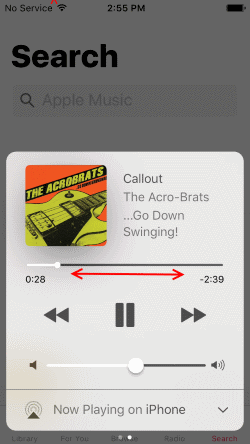
  4. Drag the ball on the music timeline bar to the desired spot. Alternately, you can tap and hold the fast-forward or rewind buttons as well to skip ahead or backtrack respectively.

iOS6 and Lower

  1. Hold the device in a portrait orientation.
  2. While a song is playing, the album art will appear. If there is no album art, a music note appears instead. Tap the album art/note.
  3. Now you will see a bunch of features you may not be aware of. One of them is the line that indicates where on the music track your song is playing. You can now drag the ball back and forth to fast forward or rewind.

iOS fast forward and rewind music

Categories: iPhone

Author Mitch Bartlett

My name is Mitch Bartlett. I've been working in technology for over 20 years in a wide range of tech jobs from Tech Support to Software Testing. I started this site as a technical guide for myself and it has grown into what I hope is a useful reference for all. Mitch's Favorite Gear ATX Graphics Card CanaKit Raspberry Pi 3

You Might Also Like

  • Apple logo

    Fix – iPhone or iPad Won’t Turn On

    Mitch BartlettiPhone
  • Does Wi-Fi Data Count Toward Wireless Plan Data Usage?

    Mitch BartlettAndroid
  • How to Use Game Emulators on iPhones

    MonaiPhone
  • Sync iOS with Google Accounts

    MonaAndroid

Comments

  1. Charlie says:
    March 7, 2019 at 9:38 am

    Thanks for posting , but what you have here is way too old. Apple Iphone do not have an option to fast forward or rewind to in music app anymore accept that fast or rewind for 30s . Yes you can drag a ball on music timeline back to the beginning of the song but it would not take you back to the previous songs. You drag it down all the way and it will jump to the next songs.. it is very very annoying but I guess APPLE do not care and do not want to fix it. I am using Iphone X with the latest IOS 12.1.4.

  2. Philip Beck says:
    January 23, 2018 at 8:29 am

    All I want back is the old fashioned rewind and FF buttons!

  3. Gavin Townsend says:
    August 6, 2017 at 2:35 pm

    I have found this to work on mp3 files that are less than 4 hours in length. But after four hours, you can’t fast forward at all. The phone thinks a 7 hour audio book is only 4 hours long. The file will play beyond the four-hour mark, but you can’t control where you are in the book after that mark. If you pause and then hit play again, the book returns to the four-hour mark. Highly annoying. Is there a fix?

Leave a Reply

Your email address will not be published. Required fields are marked *

This site uses Akismet to reduce spam. Learn how your comment data is processed.

300x600
Turning on Triple Touch Zoom on Android

Turning on Triple Touch Zoom on Android

How to Connect Outlook 2023 to Gmail

How to Connect Outlook 2023 to Gmail

Netflix: Change Password

Netflix: Change Password

Everything You Need to Know About WhatsApp Delete for Me

Step-by-Step Guide: How to Use WhatsApp on Your Computer

Android: Enable or Disable Background Data

Android: Enable or Disable Background Data

300x250
profile pic

The Experts Behind Technipages

My name is Mitch Bartlett. I've been working in technology for over 20 years in a wide range of tech jobs from Tech Support to Software Testing. I started this site as a technical guide for myself and it has grown into what I hope is a useful reference for all.

Learn More

300x250 2
technipages logo white
linkedin icon

Technipages is part of Guiding Tech Media, a leading digital media publisher focused on helping people figure out technology. Visit guidingtechmedia.com to learn more about our mission and team.

© 2026 Guiding Tech Media All Rights Reserved

  • About Us
  • Contact
  • Legal & Privacy

© 2026 Guiding Tech Media All Rights Reserved

Information from your device can be used to personalize your ad experience.
Do not sell my personal information.