

If you own an HP printer, you should definitely get an HP Ink subscription, especially if you print hundreds of pages every month. This subscription includes ink or toner, free delivery, and prepaid recycling. HP monitors your ink or toner levels via the HP Smart app and ships new cartridges before you need them. In this manner, you’ll never run out of ink.
But sometimes, a strange error message may pop up on the screen preventing you from finalizing your HP Ink subscription. Wait for 30 seconds, try again, and check if you notice any changes. If the issue persists, follow the steps below.
Fix: Cannot Finalize HP Ink Subscription
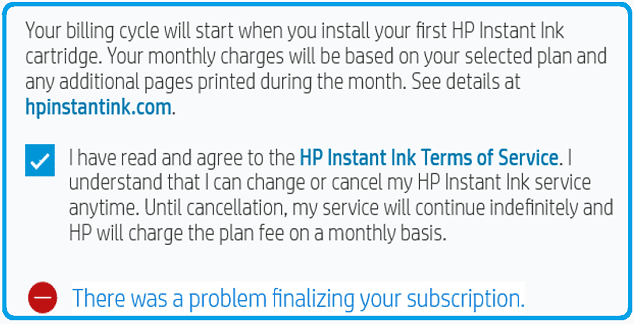
Use a Browser to Finalize the Subscription
The best way to manage your HP printer is through the HP Smart application. If you’re getting this error message when using the HP Smart app, open a new browser tab, and go to the HP Instant Ink page. Sign in to your HP account and check if you can activate the subscription online.
Update Your Printer Firmware
Be sure to update your printer firmware to the latest version. Go to HP’s support page and identify your printer model. Then, download and install the latest printer firmware version.

Printers are sometimes stored for months before getting sold. Most likely, the firmware is outdated. This can lead to various issues, including not being able to finalize your HP Ink subscription. Your printer should automatically install the latest updates when it connects to Wi-Fi. That doesn’t always happen, which means that you’ll need to manually install the latest printer firmware.
Ensure Your Printer and Cartridge Are Compatible With HP Ink
Make sure your printer is compatible with HP Ink. Most HP printers manufactured in the last 5 years that support Wi-Fi are eligible for HP Ink. If you’re using an old printer, maybe it’s time to upgrade to the latest HP Ink-enabled printers.
Additionally, make sure your ink is compatible with HP Instant Ink. The following ink and toner cartridges are supported:
- HP 62
- HP 63
- HP 64
- HP 65
- HP 67
- HP 902
- HP 910
- HP 950/951
- HP 952
HP 962 - HP 134 (toner)
If the issue persists, contact HP Support for further help. Maybe the service is temporarily unavailable.
Conclusion
If you can’t finalize your HP Ink subscription, wait for 30 seconds, and then use a browser to activate your subscription. Then, update your printer firmware to the latest version. Additionally, ensure your printer and cartridges are compatible with HP Ink. If nothing works, contact HP Support.
Did you manage to solve the problem? Hit the comments below and let us know which solution worked for you.


No and spent over an hour on the phone and still not sorted!!
Nope and spent nearly two hours on the phone to hp support – still not sorted – sending it back