Skip to content
LogoTechnipages
technipages logo
  • Topics
        • Android
        • Browsers
        • Gaming
        • Hardware
        • Internet
        • iPhone
        • Linux
        • macOS
        • Office
        • Reviews
        • Software
        • Windows
        • Definitions
  • Product Reviews
  • Downloads
  • About

How to Stream Origin Games Over Steam

Mitch BartlettFebruary 2, 2021 Comments (5)

One of the best features of Steam is the ability to install a game on one computer and stream it to another. It comes in handy if you want to play a game that uses many resources from a less powerful computer such as a laptop.

Not only can you use the Steam streaming feature for games purchased from the Steam store, but you can also stream non-Steam games from Origin such as Sims 4 and SimCity. Just follow these steps.

  1. Download and install Steam on both the client and host computers.
  2. Open Steam on the host computer.
  3. Select to view “Library“.
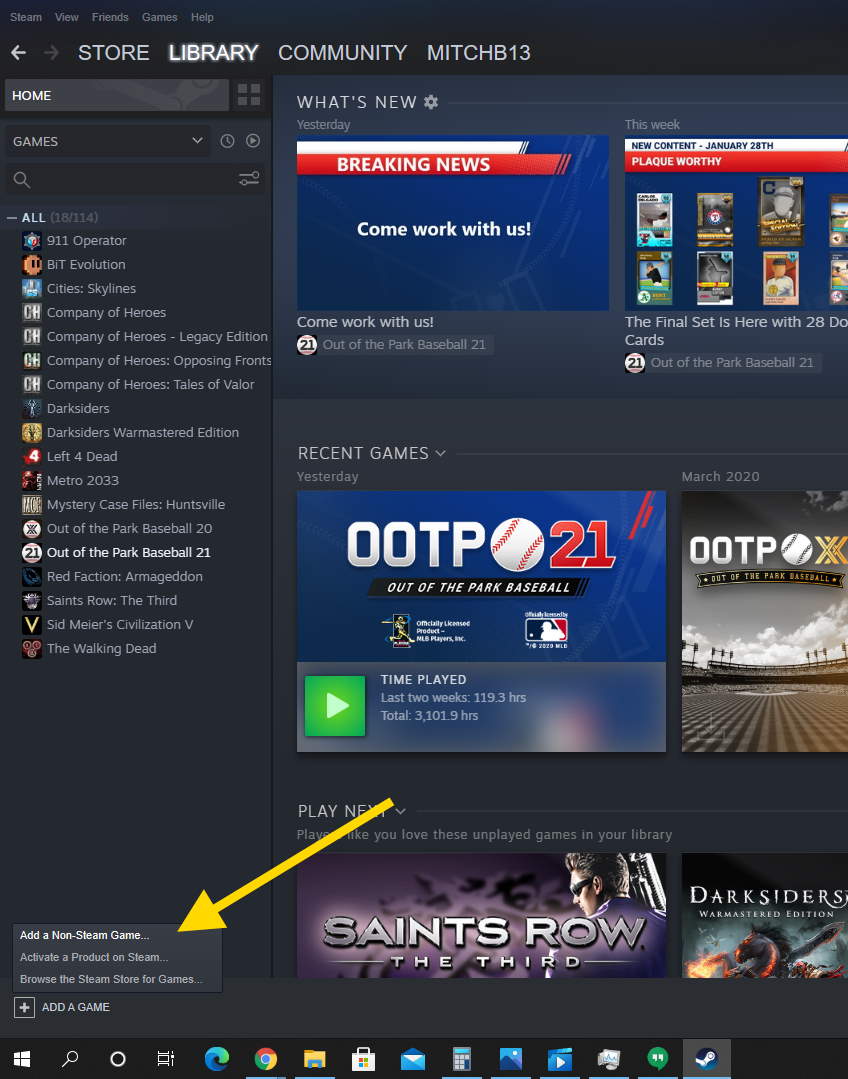
  4. Select the “ADD A GAME” menu at the lower-left portion of the window, then choose “Add a Non-Steam Game…“.
    Steam Add Non-Steam Game
  5. Choose the Origin game from the list, then select “Add Selected Programs“.
  6. From the computer where the Origin game is installed, open Origin.
  7. Go to the “Origin” menu, and select “Application Settings“.
  8. Select “Origin In Game” in the left pane.
  9. Uncheck the “Enable Origin in Game” check box.
  10. Select “Advanced” in the left pane.
  11. Check the “Automatically exit Origin after closing a game” option, then close Origin.
  12. From the client computer, launch Steam.
  13. Select your game, then choose the “Stream” button.
The game should now launch and stream from your computer over the network.

I hope this guide has helped you add non-Steam games offered by Origin to your Steam library. Feel free to leave a comment below.

Categories: Gaming

Author Mitch Bartlett

My name is Mitch Bartlett. I've been working in technology for over 20 years in a wide range of tech jobs from Tech Support to Software Testing. I started this site as a technical guide for myself and it has grown into what I hope is a useful reference for all. Mitch's Favorite Gear ATX Graphics Card CanaKit Raspberry Pi 3

You Might Also Like

  • MAME-roms-zip

    MAMEUI: “Error: required files are missing, the game cannot be run” – Fix

    Mitch BartlettGaming
  • microsoft sudoku not saving progress

    Fix Microsoft Sudoku Not Saving Progress

    Madalina DinitaGaming
  • Oculus

    VR Oculus Quest 2: How to Configure the Color of Your Guardian Boundary

    Mel HawthorneGaming
  • How to Play Xbox Game Pass on Steam Deck

    Andrew MyrickGaming

Comments

  1. Kumar says:
    July 31, 2020 at 5:19 am

    The game launches, but my controller (Xbox) won’t work through Steam Link (only my kebyoard)

  2. JR says:
    January 1, 2019 at 8:12 pm

    I’m not finding a “stream” button. I’m trying to stream sims4 to a client pixelbook but I only see a “play” button on the host launcher.

  3. ITiger says:
    June 22, 2015 at 1:57 am

    Workaround for Games that won’t start this way:

    1. Chose a game with a launcher to stream to your client (e.g. Borderlands – Pre Sequel) and klick on the stream button.
    2. Minimize (do not close, just minimize. Perhaps you also need to mute it) the Launcher.
    3. Now you see the desktop of your Host-PC, so now you can start anything you like and launch it yourself.

    I hope this helps.
    ITiger.

  4. jeff seggelke says:
    March 17, 2015 at 10:28 am

    Sims 4 is not working for this. Everytime I try, it closes steam on the host computer.

  5. computerdude100 says:
    March 2, 2015 at 8:28 pm

    See, they put this option because no one likes Origin. Haha!

Leave a Reply

Your email address will not be published. Required fields are marked *

This site uses Akismet to reduce spam. Learn how your comment data is processed.

300x600
Turning on Triple Touch Zoom on Android

Turning on Triple Touch Zoom on Android

How to Connect Outlook 2023 to Gmail

How to Connect Outlook 2023 to Gmail

Netflix: Change Password

Netflix: Change Password

Everything You Need to Know About WhatsApp Delete for Me

Step-by-Step Guide: How to Use WhatsApp on Your Computer

Android: Enable or Disable Background Data

Android: Enable or Disable Background Data

300x250
profile pic

The Experts Behind Technipages

My name is Mitch Bartlett. I've been working in technology for over 20 years in a wide range of tech jobs from Tech Support to Software Testing. I started this site as a technical guide for myself and it has grown into what I hope is a useful reference for all.

Learn More

300x250 2
technipages logo white
linkedin icon

Technipages is part of Guiding Tech Media, a leading digital media publisher focused on helping people figure out technology. Visit guidingtechmedia.com to learn more about our mission and team.

© 2026 Guiding Tech Media All Rights Reserved

  • About Us
  • Contact
  • Legal & Privacy

© 2026 Guiding Tech Media All Rights Reserved

Information from your device can be used to personalize your ad experience.
Do not sell my personal information.