

Facebook is an excellent social media platform for business promotion. Entrepreneurs can create a business page to advertise their services and invite people to learn more about their company. But sometimes, when you try to visit a business page, you may get an error message saying there was an error fetching data. Let’s see what you can do to solve this issue.
How Do I Fix Error Fetching Data on Facebook?
- Log out of Facebook. First things first, try logging out of your account. Then close your app or browser, wait for a few seconds and log back in. Check if the error is gone.
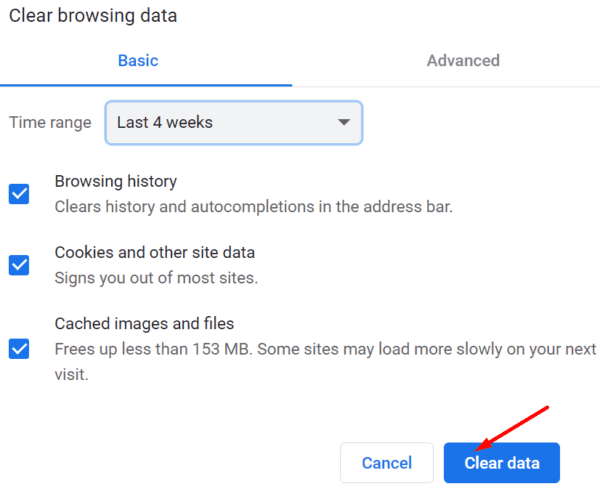
- Clear your browser cache and cookies. If you’re using a web browser to log in to your FB account, clearing your cache and cookies may help fix the problem.

- Disable your extensions. If you’re using ad-blockers or privacy extensions, they might be interfering with Facebook’s scripts triggering the “error fetching data” message.
- Update your browser. Check if there’s a newer browser version available and install it on your machine.
- Clear your Facebook app cache. If you’re using the Facebook mobile app, go to Settings, select Apps, go to All Apps and tap Facebook. Go to Storage and hit the Clear cache button. Restart your terminal and try again.

- Update or reinstall your app. Again, if you’re using the Facebook app, check if a newer app version is available. Install it and restart your device. If the issue persists, uninstall and reinstall the app.
- Use a different connection. Make sure your network connection is stable. If possible, switch to a different connection and test if you notice any improvements.
- Use a different device. Log in to your Facebook account on a different device and check if the error persists.

Conclusion
If you can’t visit a specific Facebook page because there’s been an error fetching data, log out of your account and then log back in to establish a new server connection. Then update your browser, clear the cache and disable your extensions. If you’re using the mobile app, update the app, and clear the cache. Did these troubleshooting suggestions help you fix the problem? Share your feedback in the comments below.



My Facebook is not loginng in saying error as fetching data
Please kindly assist
Tanks
Please help me., i cant access my facebook because it say there was an error fetching date., please please please help me fix my facebook account????????
Please help i cant access may facebook because it say there was an error fetching the data. Please help thank you so much
I have done everything to try to fix my Facebook it still pops up there was an error fletching the data
Dear. Sir .. my facebook not working it says there was error fetching data… pls help
I would like to get into my old Facebook account it was hacked in January. They changed everything.
I have my business page attached to it sadly.
I created a new page w the same name and same email. I constantly get error fetching data message. I’m extremely frustrated. I emailed fb and no help
Did not help. FB works fine on my iPad.. but not on iPhone.
error fetching data on my iphone ,
Constant there was an error fetching data!! Freaking annoying!! I’ve tried everything!! Please help!
Error fetching data happens all the time
There is an error fetching data
Help how can the problem be fixed
I didn’t get any answers in comments
I can’t even view facebook at all without it saying Error fetching Data.
I have an iphone. I have looked for updates, Uninstalled the app twice and restarted my phone. HELP
Facebook doesn’t care about this issue and will never help you. They are just another worthless company! I can’t use my mobile version at all. Just delete Facebook and forget about them.
No I cannot see my photos. I have tried everything all these steps and nothing works. My uploads say ‘couldn’t load photos’ and my ‘photos of you’ say ‘couldn’t load photos. I’ve done everything imaginable and nothing seems to fix it. Is it a Facebook issue or an issue with the app? It’s been like this for almost a month all day every day.
I tried Everything and it’s still not working on my mobile app
Has anyone tried these steps? Have they worked?
When I go into ‘Likes’ it keeps coming up with no data available.
It’s only just started doing it. I’ve tried everything and it’s still not working.
I cant access who sent likes on facebook, it says no data available, i have tried re installing facebook and clearing cache its still saying no data?
When I try to see the reactions on the post it’s saying no data available what should I do ??
No
I am really struggling to view any Facebook pages via my Facebook app it keeps saying no data available.
When I login via the website on browser it works fine but isn’t letting me view any pages on Facebook app. I have tried everything and still nothing. Can you help?
No. I deleted the app and reinstalled after doing software update on my IPhone and it still doesn’t work. Is this an IPhone issue or a FB issue? None of the suggestions for the phone or FB fixed the issue.
Tried everything just get
“There was an error fetching the data”
My page isn’t loading and it will not let me post
I need my account to be recovered pls help me I have many things connected to my fb id
my facebook cannot view few specific pages that I followed & ????????
It show no data available on my iphone facebook app.
but it was working well on my the other phone.