Skip to content
LogoTechnipages
technipages logo
  • Topics
        • Android
        • Browsers
        • Gaming
        • Hardware
        • Internet
        • iPhone
        • Linux
        • macOS
        • Office
        • Reviews
        • Software
        • Windows
        • Definitions
  • Product Reviews
  • Downloads
  • About

How to Create a Shortcut to Windows 10 Calculator

Judy SanhzJuly 1, 2020 Comments (1)

Sure, you could do the math yourself, but why not make good use of the Windows 10 calculator? You may have the intention of using it, but the idea of having to manually look for it dissuades you.

But, if you’ve noticed that you’re using the calculator more and more, it’s best to create a shortcut for it. That way, you’ll be more inclined to use it, and you’ll save time in the process.

Add a Calculator Shortcut to Windows 10  Home Screen

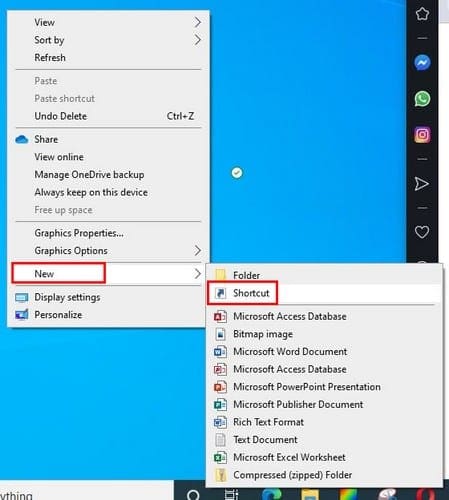
To make a calculator shortcut, right-click on an empty space on your home screen and place the cursor on the New option. When the side menu slides out, click on the Shortcut option.
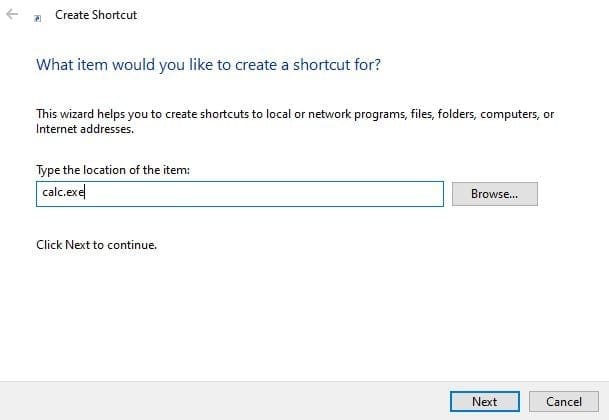
In the create shortcut window type, calc.exe and click on the Next button at the bottom right. Don’t forget to name your shortcut and click on the Finish button.
The calculator shortcut will now be in the empty space you clicked on before. But, if you don’t feel like closing your open browser windows, you can always pin the calculator shortcut to the taskbar.

If you are willing to close your windows, you can get a sneak peek at the home screen by clicking on the empty space at the far right of the taskbar. It’s a tiny space, so you might want to be extra careful when placing the cursor there.

To pin the icon, right-click on the calculator icon and choose the Pin to taskbar option.

If you ever change your mind and want to remove it from the taskbar, right-click on it. The unpin option will be the last one down.

Conclusion

When you have to access tools that you rarely use, having to look for them doesn’t feel like work. But, when you regularly use a tool having a shortcut is so much better. How often do you use the calculator?
Categories: Windows

Author Judy Sanhz

You Might Also Like

  • windows-system-registry-file-missing-or-contains-errors

    Fix: System Registry File Is Missing or Contains Errors

    Madalina DinitaWindows
  • roll-back-from-windows-11-to-windows-10

    How to Downgrade from Windows 11 to Windows 10

    Madalina DinitaWindows
  • How to Fix Windows Printer Error 0x0000011b

    How to Fix Windows Printer Error 0x0000011b

    Madalina DinitaWindows
  • Outlook: Your Digital ID Name Cannot Be Found

    Madalina DinitaWindows

Comments

  1. Francis Moore says:
    December 30, 2020 at 5:46 pm

    how do I download A calculator to my desktop?

Leave a Reply

Your email address will not be published. Required fields are marked *

This site uses Akismet to reduce spam. Learn how your comment data is processed.

300x600
Turning on Triple Touch Zoom on Android

Turning on Triple Touch Zoom on Android

How to Connect Outlook 2023 to Gmail

How to Connect Outlook 2023 to Gmail

Netflix: Change Password

Netflix: Change Password

Everything You Need to Know About WhatsApp Delete for Me

Step-by-Step Guide: How to Use WhatsApp on Your Computer

Android: Enable or Disable Background Data

Android: Enable or Disable Background Data

300x250
profile pic

The Experts Behind Technipages

My name is Mitch Bartlett. I've been working in technology for over 20 years in a wide range of tech jobs from Tech Support to Software Testing. I started this site as a technical guide for myself and it has grown into what I hope is a useful reference for all.

Learn More

300x250 2
technipages logo white
linkedin icon

Technipages is part of Guiding Tech Media, a leading digital media publisher focused on helping people figure out technology. Visit guidingtechmedia.com to learn more about our mission and team.

© 2026 Guiding Tech Media All Rights Reserved

  • About Us
  • Contact
  • Legal & Privacy

© 2026 Guiding Tech Media All Rights Reserved

Information from your device can be used to personalize your ad experience.
Do not sell my personal information.