
Google Maps is one of the most popular navigation apps out there. In this quick guide, we will show you how to find the halfway point on Maps. Basically, there are two ways to do that: either use the Measure Distance option or calculate the coordinates yourself. As a bonus, we’re also going to list a few handy alternatives at the end of this post.
How to Find the Midpoint Between Two Points on Google Maps
Google Maps does not support the halfway point feature. In other words, the app cannot automatically calculate the midpoint between two different locations, or multiple locations for that matter.
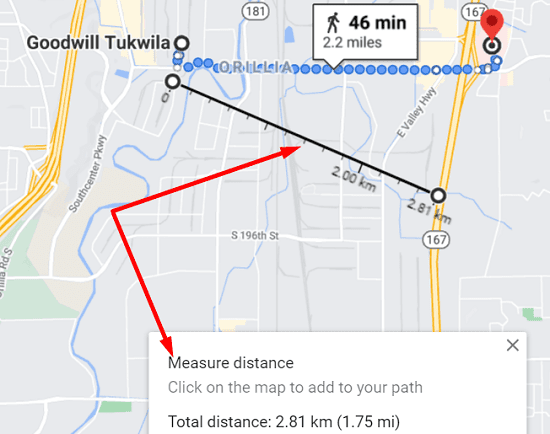
Measure the Distance
One workaround is to simply measure the distance between the two points and locate the midpoint. We already published a quick guide on how to measure distances on Google Maps.
Basically, you need to right-click on your starting point, select the Measure distance option and click on the map again to mark the second location.
Calculate the Halfway Point Using Coordinates
Another solution is to simply do the math and calculate the midpoint using coordinates.
- First, you need to get the coordinates of each point.
- Then, add the latitudes of each, and divide by two.
- After that, add the longitudes of each location, and divide by two.
- Write down the new coordinates. What you get is actually the latitudes and longitudes of the midpoint.
- Enter the new coordinates in Google Maps.
For more information, check out these two handy guides:
How to Find the Central Location Between Multiple Addresses
Don’t have the time to measure the distance between the two points or manually search for the right coordinates? You can use a web app that automatically calculates the halfway point between two or more addresses.
As a matter of fact, we suggest using a web app if you need to find the midpoint between multiple locations. The two methods listed above lose their accuracy and relevance when finding the halfway point of two or more points that are not located in the same octant of the globe.
Three excellent web apps that automatically calculate the halfway point between different locations are WhatsHalfway, MeetWays, and A place between us. Enter your addresses, select the type of venue you’re interested in and let the tools take care of the rest. It’s as simple as that.
As you can see, when it comes to finding the halfway point, Google Maps is not exactly the easiest tool to use. Hopefully, the search giant will add this functionality to Maps sometime in the future.
Conclusion
To find the halfway point between two addresses on Google Maps, you can either measure the distance between the two locations or calculate the midpoint using coordinates. Alternatively, you can use a web app that will automatically do the math for you. So, which of these options do you prefer to use? Let us know in the comments below.



What is half way from where I am now till I get home to my address now.
I have ask google the half way point to GoldBar Washington from Vale Oregon and it gives me Seattle and Salt lake City that is not what I ask for.