Do you use iPhone or iPad? Try these Google apps for iOS to get the most out of your Apple device.
Although Google has become synonymous with the search engine, it’s the least you can do with it. However, several other Google apps are available for iPhone and iPad users, even if you set aside the popular email client Gmail.
Let’s go to the list of Google apps iOS users can use.
Lesser Known Google Apps for iOS Users
1. Google Podcasts

It may not be the most popular podcast platform, but Google Podcasts is a free app that iOS users can try.
It can play episodes of your favorite shows on subjects such as news, music, history, technology, business, education, comedy, science, and sports.
Here, you can explore tailored recommendations, subscribe to your favorite podcasts, and track your listening activities.
Google Podcasts offers various customization features, including adjusting the playback speed, skipping the silence, queueing up episodes, auto-download options for offline listening, and more.
This app lets you listen on multiple devices like phones, laptops, and smart speakers. Not to mention, it also enables you to manage your listening history and stream episodes for instant listening.
2. Google Tasks: Get Things Done
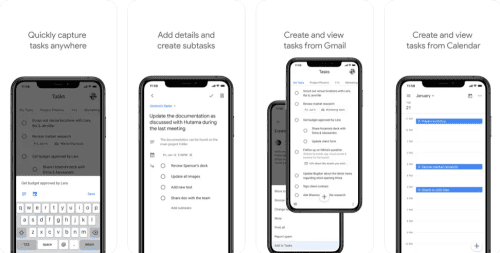
If you’re looking for an iOS app for planning, organizing, and scheduling your daily tasks, Google Tasks is here for you. This is also a free app that iPhone and iPad users can download and use without restrictions.
Add, edit, and manage your to-do tasks from anywhere, anytime. It automatically syncs the changes and makes them available on all devices instantly.
Moreover, it supports integration with Gmail and Google Calendar. Likewise, the app lets you break down a task into subtasks. For additional focus, you can add details about the to-dos.
Google Tasks also lets you set a due date for each task and directly create a task from an email.
3. Google Jamboard
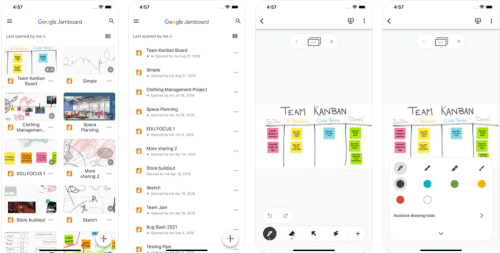
Instead of using any random whiteboard app, iPhone and iPad users can opt for Google Jamboard. It offers a rich collaborative experience for colleagues and classmates.
You can become as creative as you want with this free app. Create, edit, and share your jams with others. You also get the freedom to draw using different pens and colors.
It supports adding sticky notes for brainstorming. Moreover, you can insert photos and stickers into the jams to make them more lively.
You can import Google Drive files from your G Suite for collaborative document annotation.
4. Fabby Look — Hair Color Editor

Want to change your hair color but don’t know which one will suit you? Try Fabby Look, a free, fun-filled hair color editor from Google.
It also lets you real-time experiment with your hair color before taking a video or photo. You can also use it to prank your family and friends about hair color.
Here, you get more than ten trendy color styles, including blue, pink, purple, magenta, and platinum. Also, you can share the results with the world through Facebook, Instagram, Snapchat, etc.
5. Google Family Link

Nowadays, managing your kids’ screen time can be challenging. However, parents can use Google Family Link to ensure parental control for their kids.
This free app helps you create healthy digital habits for the young members of your family. It comes with various easy-to-use tools that users can use to know their child’s screen habits, see their device location, and manage privacy settings for the devices.
You can also set a screen time limit for them and ensure they can only access age-appropriate content on the web. It’s also helpful to track where your kids go and get notifications as they enter or leave a specific location.
6. Google Cloud Search
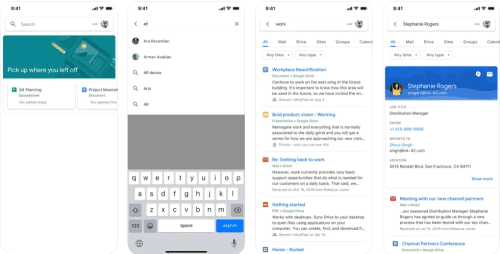
Google Cloud Search lets you find search and find any file from your organization’s Google Workspace account. However, you can access this service only if your organization has this enabled, so check with your system admins to confirm it.
It lets you search through Gmail messages, Drive files, docs, slides, sheets, calendars, and more. You can even quickly find your colleagues and connect with them seamlessly.
This free app also helps you stay organized throughout the workday by providing time assist cards.
7. Google Primer
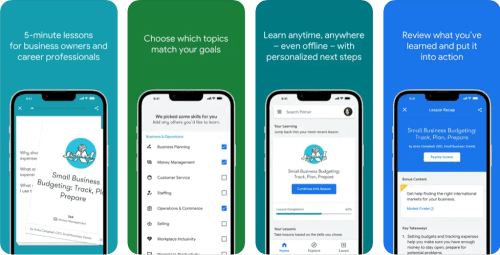
If you want to learn digital marketing skills to promote and rank websites on Google, which platform could be better than Google Primer?
This free Google app for iOS devices facilitates quick and easy learning of new digital marketing and business skills. It also works offline, so you can gather knowledge whenever you have five minutes of free time.
Lessons available in this app include digital advertising, business planning, management, sales, content marketing, SEO, social media, business analytics, and branding.
Moreover, each lesson will prepare a personalized next step for you. Hence, you can utilize your newly acquired skills right away.
Besides allowing you to gain business and marketing knowledge quickly, it lets you keep track of your learning progress.
8. Socratic by Google
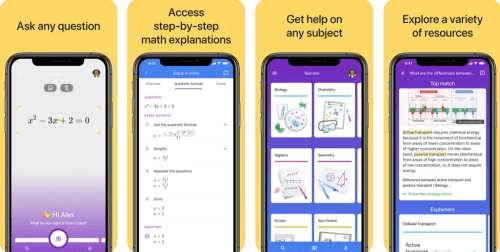
You may not have heard of this learning app by Google named Socratic. If you’re stuck with your schoolwork, this free app uses Google AI to make you understand the problem and offer its solution.
High school and university students can use this app as it’ll provide them with the best online resources for learning any concept.
It covers Algebra, Geometry, Trigonometry, Calculus, US and World History, Literature, Earth and Environmental Science, Biology, Chemistry, and Physics.
This app offers expert-created visual explanations on various subjects and concepts. You can check out the videos or go through the step-by-step explanations of the problems to learn from anywhere.
9. Creative Preview

The last entry in our list of lesser-known Google apps is Creative Preview. It’s a mobile ad-testing app that lets you test directly on your iPhone or iPad.
Using it, you can better understand how the audience will experience your live ad. The testing is possible on any mobile web browser or supported mobile ad SDKs.
This free app also lets you review reporting metrics in its console. Besides Google Mobile Ads, it supports Interactive Media Ads (IMA).
Google Apps for iOS: Final Words
Google isn’t just a search engine or email client service provider. It offers a vast collection of apps for iPhone and iPad users.
This list will familiarize you with the lesser-known Google apps that offer robust features. Tell us which Google app for iOS you loved most!
Up next best email apps for iPhone.