

If the status_breakpoint error on Chrome is preventing you from using the browser, here are a few troubleshooting methods that may come in handy.
Chrome breakpoint errors usually occur randomly while users are scrolling a web page or browsing their favorite websites.
This error code seems to occur more frequently when you overclock your CPU close to its max usage while browsing with Chrome.
How to Troubleshoot Chrome Status_Breakpoint Errors
1. Install the latest Chrome version
If you’re running outdated Chrome versions, don’t be surprised if you get various errors a lot more frequently than usual.
Make sure you’re running the latest Chrome version. Go ahead and click on the three-dot menu, and then go to Help and About Google Chrome.

2. Disable extensions
Some of the extensions you installed may also trigger status_breakpoint errors. To test if this is the root cause of the problem, turn off all your extensions. Then refresh your browser and check if the error is gone.
To take this one step further, you can also uninstall the extensions that you haven’t used in a long long time. Why clutter your browser with useless extensions that you no longer use?
3. Disable overclocking software
As stated at the beginning of this guide, status_breakpoint browser errors indicate your computer is not stable when overclocked. Many users said the browser did not crash at 5Ghz but going beyond that value made Chrome crash every few minutes.
The quickest solution is to simply disable your overclocking tools and not use any programs that push your hardware to maximum usage while browsing with Chrome.
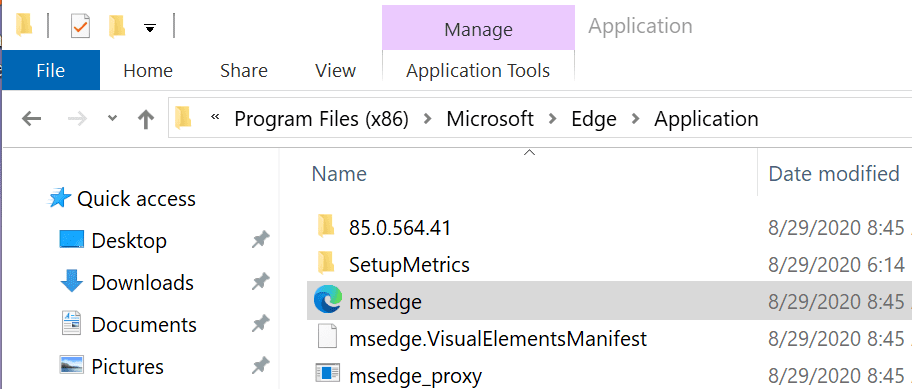
4. Rename the msedge.exe file
If you’re getting the status_breakpoint error while using the Google search engine on the Edge browser, renaming the msedge.exe file should do the job.
- Navigate to C:\Program Files (x86)\Microsoft\Edge\Application

- Right-click on msedge.exe and rename it to myedgebrowser.exe
- Restart the browser and check if the error persists.
And if nothing worked, try switching to another browser or a different search engine. Maybe Chrome is affected by a temporary glitch.



i have just made firefox administrator .. i have microsoft , bing and my pages when looking at shopping online dissappeared with that message page coming up…This started to happen when ,after trying to join Amazon to watch series and movies…. since making firefox admin it hasnt happened again — cross figures.. I am in no way a tex person so just played around with administrators.. cheers
I have been trying for ages to try and get this problem fixed and sent a couple of reports. I an 78 years old and don’t know much about computers but I found this and it worked.
Keywan says
June 7, 2021 at 7:49 am
I had the issue and nothing helped by trying all the tips that I found… Newtab, parameters, about chrome, extensions, favorites, none of the menus were accessibles. I always had this page with the status_breakpoint code error.
I fixed this by going to the flags page (chrome://flags/) and click on the “reset all” button
I had the issue and nothing helped by trying all the tips that I found… Newtab, parameters, about chrome, extensions, favorites, none of the menus were accessibles. I always had this page with the status_breakpoint code error.
I fixed this by going to the flags page (chrome://flags/) and click on the “reset all” button
No. I was getting random crashes with error code: Status_Breakpoint. I found a youtube video that suggested running a compatibility check under the Chrome and Edge icons. The check made changes and requested I test changes which worked. That fixed the problem.