

If you regret sending a message to someone via Facebook Messenger, don’t panic. You can still do something about it.
Maybe you sent the message to the wrong person. Or maybe you realized you might have been too harsh on that person. Maybe you’re afraid that person might forward your message to one of their contacts. You can fix all that if you act fast.
Steps to Delete Facebook Messages From Both Sides
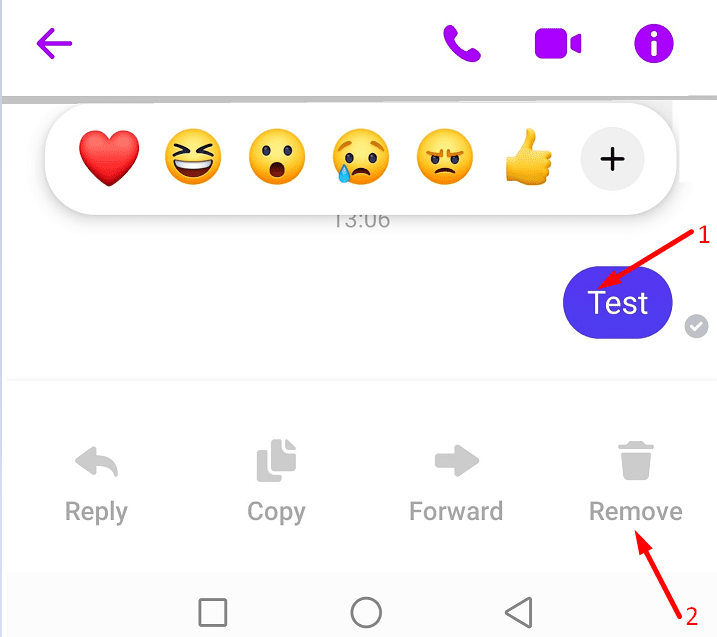
- On your phone, tap and hold the message you want to delete.
- Then select Remove.

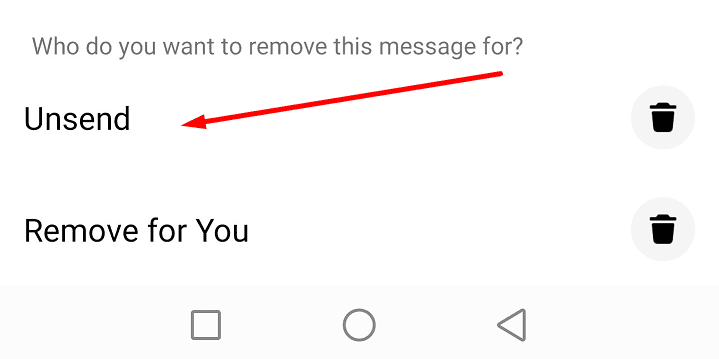
- Tap the Unsend option when asked who you want to remove the message for.

- Confirm your choice when prompted to do so.

- If the message was successfully deleted, you should see a confirmation note saying ‘You unsent a message‘.

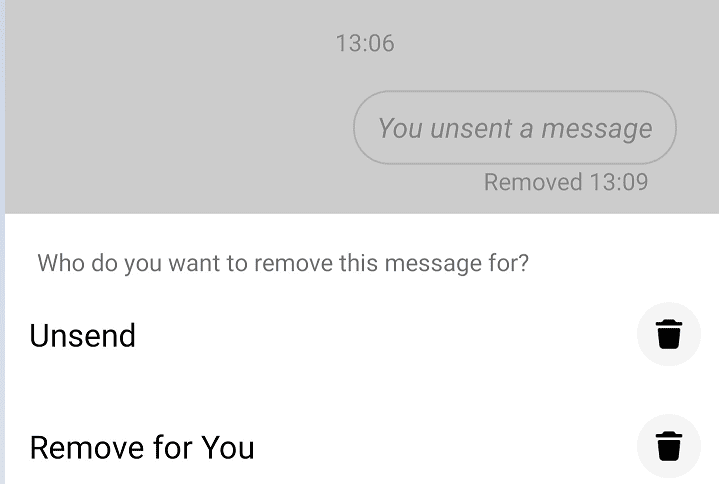
On the other hand, the recipient will also get a note informing them you deleted that message. Unfortunately, there’s no way to hide that note. If you delete a message, the recipient will know you did that.
You can always delete the ‘You unsent a message’ note from your Messenger app. However, this does not mean the note will disappear from the recipient’s chat history. You can only remove the note from your chat history. Other chat members will still be able to see it.
⇒ Note: Facebook previously had an option called ‘Remove for Everyone’. The option is no longer available. But you can use the Unsend option to do the same thing.
THE Number One Rule
The Number One Rule is not to send messages that you might regret sending later. Don’t send messages that could land you into trouble. Keep in mind that even if you manage to use the Unsend option, the recipient may have already taken a screenshot of the chat history.
Many Facebook users welcomed the option to unsend messages. But the option is only available 6 months after you sent the messages. Facebook users cannot unsend messages that are older than 6 months. In this case, the only way to delete the respective messages is to actually ask the recipient to do so.




The problem now is the only thing I can see there is ‘Remove for you’
How do you delete the media, files and links in Facebook messenger for both parties in the chat?
It won’t let me delete my messages from the messenger app only the ones I received is there a way to delete the whole conversation?
After I send a message and I get a reply I always delete the message and the reply as I like to have an empty box.. Are you saying that the recipient of my message still has the message?
Am very grateful ???? it’s help me, l appreciate ????
Nice meeting you
but this is only one i want it all my messages be as unsend
Unfortunatly this 6 months is false news. Apparently you can unsend the whole history. Someone did it for me. Unsent the whole conversation in many years like 10 years or so. How is this possible? And I doubt that it was done click by click.
Great article! I’d like to give one useful tip. I use a software called cucomm. It automatically sends messages to users, and I save a lot of time. I advise you to try and make sure.
Users are more likely to delete comments from strangers. I have installed software that automatically adds people to friends on Facebook and sends them messages. I advise you to try and make sure.
How shall i delete all message on messenger from both side at one time.
What do I do when it says that I can’t unsend the message even though it hasn’t been read?
I just want my facebook and messenger
I have deleted Facebook.wsny yo delete messenger too
How is it possible for the recipient of a message to delete it from the sender’s page & their own {recipient} & no ‘unsend message removed’ notification??
No,!!
What if I don’t want anyone to unsend any messages when they are messaging me?
Why am I not able to make that choice? Just put a lil badge that represents that I won’t allow ppl to delete a message they send me! Cuz no one sends me messages on accident.
Is there are any ways to delete the unsent messages or text history of my friend?
Well done guys, you should also delete those messages from your servers which are sent by a person to another person if both of them don’t interact with each other for a long time (6 months or more) just as Whatsapp (owned by Facebook) does
i wanted to clean up my old messages in messenger, the senders conversation can be DELETED but when the receiver reply my comment says UNSEND. why can’t i DELETE no unsend my comments.
In the past it was not a problem i think i was able to do that
How can I hide my unsend message from someone else’s Messenger? How to do?
There are no answers to any of the above questions. So no this was no help at all!!
How can. I Delele some tex messages after 2 or 3 days from ather person that i taked to .
I can delete from some frinds but from ather one from overseas I just cant ..
Thanks
Is there any way to delete the message on both ends so the other person cannot use it against me?
no
received link received link “https://tjh.re/GKod”
after receive users contacted me t o ask if i sent the link. I did not send the link. Was able to contact people to tell them not to open link. I do not send links. Friend recommended closing “facebook” then resetting password.
After sending message about not sending the link and not to open. Several individual were able to close facebook and change password which worked for establishing communication after incident.
How do I delete the link in messenger after the 10 minute rule outlines in facebook guidelines
Thank You
I sent my address in Facebook messenger and now I’m alarmed at the person I sent to. How can I delete or unsend when it’s been longer than 10 mins. The only option I see is remove for me.
I want to delete a message sent and received. How do I do that?
Is there away to recover audio Facebook messages that I received earlier but was later deleted by the sender. All I can see now is “XYZ unsent a message”. Any input is appreciated! Thanks!
Is there any way to delete the message on both ends so the other person cannot use it against me?
Hi
By mistake I sent an important doc pics to everyone from messenger to marketplace customers..
How to delete bothside.
I tried bt there is no option for everyone del for marketplace messages.
Pls help very urgent.
I can’t download my messenger to delete all the messages. I did not k ow you did this. Help me to get on it so I can take care of the problem
Can I delete more than one at a time?
I need to delete messages and pictures from my ex but im blocked now so I can only remove for me. How do I delete on both ends
How does someone delete their messages next to their chat head and leave mine up
Hello, I have deleted few chat history in messenger. Actually I need to select as “Unsend” but by mistakenly selected as “Remove for you” option. Actually they all are my friend of friends. I am not remembering their names (7 friends).
Please suggest me what I need to take required steps for delete messages by permanently.
I don’t know what happened . But when I open messenger I have someone I’d know instead of me. She is leaving horrible words. I can’t get or find my messenger
how can you delete messages from both sides of the other person blocked you already, so the “remove/unsend from everyone” isn’t an option anymore. I am currently trying the mark as spam then deleting Facebook and messenger for – what I’m unsure of – a few hours or few days? has anyone had success with this?