Skip to content
LogoTechnipages
technipages logo
  • Topics
        • Android
        • Browsers
        • Gaming
        • Hardware
        • Internet
        • iPhone
        • Linux
        • macOS
        • Office
        • Reviews
        • Software
        • Windows
        • Definitions
  • Product Reviews
  • Downloads
  • About

Facebook: Find People Using Email Address

Mel HawthorneMarch 19, 2020 Comments (4)
Facebook Header

Facebook is a great tool for staying in touch with friends and family, but with over 2 billion monthly users, the odds of finding someone’s profile with their name alone are low – especially since they may not even be using their real or full name! Thankfully, there is another option – you can look for people’s profiles by typing in their email address!

To do so, simply login to your Facebook profile as normal, and click on the search bar at the very top.

The search bar

Enter the email address of the person you are looking for into the search bar and press enter. Be aware that your results will also include related results, such as a search for ‘spam@pork.com’ also showing you a page for Spam, and similar results.

Click on the People tab at the top in order to filter out marketplace offers, sites and more.
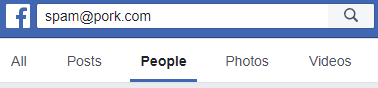
The People tab

When you’ve found the right account, click on the ‘Add Friend’ button to send them a friend request.

Tip: This whole process only works if the user has their email address set to be publicly visible in their About section. If they don’t, they won’t show up in the search results.


Categories: Internet

Author Mel Hawthorne

You Might Also Like

  • 7 Chrome Extensions to Make Gmail More Productive

    Judy SanhzInternet
  • Google Forms Header

    How to Use Data Validation in Google Forms

    Mel HawthorneInternet
  • Bitwarden: How to Unlock the Browser Extension with a PIN or Biometrics

    Mel HawthorneInternet
  • 6 Free Online Sites to Remove the Background of an Image

    Judy SanhzInternet

Comments

  1. Xandra jimmy says:
    July 14, 2022 at 12:23 am

    Please I need my face account

  2. Abu Salek sakil says:
    June 5, 2022 at 1:26 am

    Your account has been disabled
    You can’t use Facebook or Messenger because your account, or activity on it, didn’t follow our Community Standards.
    We can’t review this decision because too much time has passed since your account was disabled.
    To learn more about the reasons why we disable accounts, visit our Community Standards.

  3. Sandra says:
    May 5, 2022 at 9:48 pm

    Trying to recover my Facebook account

  4. Vir says:
    June 16, 2021 at 1:16 am

    Thank you..

Leave a Reply

Your email address will not be published. Required fields are marked *

This site uses Akismet to reduce spam. Learn how your comment data is processed.

300x600
Turning on Triple Touch Zoom on Android

Turning on Triple Touch Zoom on Android

How to Connect Outlook 2023 to Gmail

How to Connect Outlook 2023 to Gmail

Netflix: Change Password

Netflix: Change Password

Everything You Need to Know About WhatsApp Delete for Me

Step-by-Step Guide: How to Use WhatsApp on Your Computer

Android: Enable or Disable Background Data

Android: Enable or Disable Background Data

300x250
profile pic

The Experts Behind Technipages

My name is Mitch Bartlett. I've been working in technology for over 20 years in a wide range of tech jobs from Tech Support to Software Testing. I started this site as a technical guide for myself and it has grown into what I hope is a useful reference for all.

Learn More

300x250 2
technipages logo white
linkedin icon

Technipages is part of Guiding Tech Media, a leading digital media publisher focused on helping people figure out technology. Visit guidingtechmedia.com to learn more about our mission and team.

© 2026 Guiding Tech Media All Rights Reserved

  • About Us
  • Contact
  • Legal & Privacy

© 2026 Guiding Tech Media All Rights Reserved

Information from your device can be used to personalize your ad experience.
Do not sell my personal information.