Skip to content
LogoTechnipages
technipages logo
  • Topics
        • Android
        • Browsers
        • Gaming
        • Hardware
        • Internet
        • iPhone
        • Linux
        • macOS
        • Office
        • Reviews
        • Software
        • Windows
        • Definitions
  • Product Reviews
  • Downloads
  • About

Discord Error 1006: What it Means and How to Fix it

Madalina DinitaOctober 9, 2020 Comments (0)
troubleshoot discord error 1006

Discord error 1006 indicates your IP has been banned from using the Discord website. The error message reads as follows: The owner of this website (discordapp.com) has banned your IP address.

Let’s see what might have triggered this error and how you can fix it.

What Causes Discord Error 1006?

Here are some of the most common causes that may trigger this error:

  • Discord detected your IP was used to try to access certain website sections you were not authorized to access.
  • Your bots did something that determined Discord to flag and ban your IP. As a matter of fact, many users who got this error complained their IP was banned shortly after they created their Discord bots.
  • Another reasons that remain unknown to the public and only Discord is aware of.

How to Bypass Error 1006

Contact Discord Support

If you’re getting error 1006, email Discord at support@discordapp.com. Their support team will further help you.

Even if you’re sure they banned your IP by mistake, there’s not much that you can do about it.

Of course, you can still try to clear your browser cache, and maybe use a different browser.

Use a VPN

Or you can change your IP address (if it’s dynamic, of course) and even install a VPN to hide your real IP.

A VPN will assign a different IP address to your computer which should be enough to bypass this problem.

Discord can detect you’re using a VPN only if it knows the IP. But since VPNs have millions of IPs at their disposal, that makes it nearly impossible for Discord to ban a VPN-provided IP.

Some Discord users also use another trick to make sure they never get error 1006. They create their Discord account using their real IP, and then make sure to always use a VPN when using Discord.

In this manner, Discord can never ban their real IP address.

Enable random hardware addresses

Other users suggested that enabling random hardware addresses in Wi-Fi settings will confuse Discord’s databases.
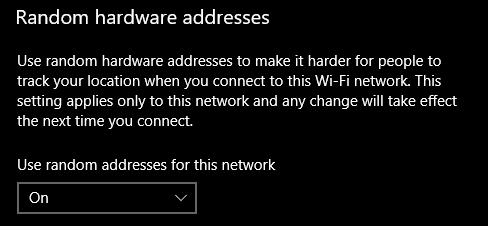
random hardware addresses wi-fi settings

We hope you managed to get rid of error 1006 and you can now use Discord without any problem.

Categories: Software

Author Madalina Dinita

You Might Also Like

  • How To Fix Static On Apples FaceTime

    MonaSoftware
  • fix zoom login issues

    Troubleshooting Zoom Login Errors

    Madalina DinitaSoftware
  • How to Generate a Hash in Notepad++

    Mel HawthorneSoftware
  • Outlook Get Add-ins Button Is Grayed Out Top 5 Solutions in 2023

    Outlook Get Add-ins Button Is Grayed Out: Top 5 Solutions in 2023

    Martin ClarkOffice

Leave a Reply

Your email address will not be published. Required fields are marked *

This site uses Akismet to reduce spam. Learn how your comment data is processed.

300x600
Turning on Triple Touch Zoom on Android

Turning on Triple Touch Zoom on Android

How to Connect Outlook 2023 to Gmail

How to Connect Outlook 2023 to Gmail

Netflix: Change Password

Netflix: Change Password

Everything You Need to Know About WhatsApp Delete for Me

Step-by-Step Guide: How to Use WhatsApp on Your Computer

Android: Enable or Disable Background Data

Android: Enable or Disable Background Data

300x250
profile pic

The Experts Behind Technipages

My name is Mitch Bartlett. I've been working in technology for over 20 years in a wide range of tech jobs from Tech Support to Software Testing. I started this site as a technical guide for myself and it has grown into what I hope is a useful reference for all.

Learn More

300x250 2
technipages logo white
linkedin icon

Technipages is part of Guiding Tech Media, a leading digital media publisher focused on helping people figure out technology. Visit guidingtechmedia.com to learn more about our mission and team.

© 2026 Guiding Tech Media All Rights Reserved

  • About Us
  • Contact
  • Legal & Privacy

© 2026 Guiding Tech Media All Rights Reserved

Information from your device can be used to personalize your ad experience.
Do not sell my personal information.