
Skip to content
LogoTechnipages
technipages logo
  • Topics
        • Android
        • Browsers
        • Gaming
        • Hardware
        • Internet
        • iPhone
        • Linux
        • macOS
        • Office
        • Reviews
        • Software
        • Windows
        • Definitions
  • Product Reviews
  • Downloads
  • About

How to Deactivate WhatsApp Account

Mel HawthorneApril 1, 2020 Comments (1)

Although WhatsApp is a great tool to have, you may find yourself wanting to get rid of your account. Simply uninstalling the app doesn’t actually remove the account that’s tied to your phone number, so here is how to properly and completely deactivate your account.

Tip: Deleting your account is permanent and cannot be undone. Be careful when choosing this option, you won’t be able to retrieve your message history, or even any backups you may still have.

On iOS:

To deactivate your account, open WhatsApp, tap the Settings symbol on the bottom right and then tap on Account. In the next menu, you’ll need to tap on Delete My Account.
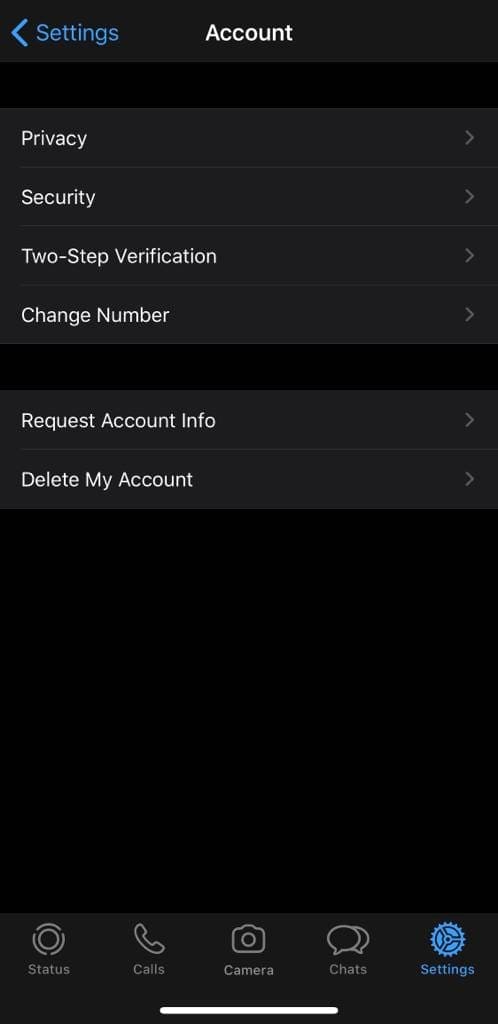
Delete My Account

Tap it, and you’ll see a screen where you will need to confirm that you really want to delete it. You’ll have to type in your number for confirmation and then tap on Delete my account again.

Confirmation screen

When you’ve completed the process, you can uninstall the app or sign back up – either way, your old account will be gone!

On Android:

To deactivate your account on Android, open up WhatsApp and tap the three buttons in the top right corner. Tap on Settings, then Account. Here, at the bottom, you’ll see an option to delete your account.

Delete my account

Tap it, and you’ll be taken to a screen where you have to confirm the account deletion by entering your phone number and tapping Delete my account.
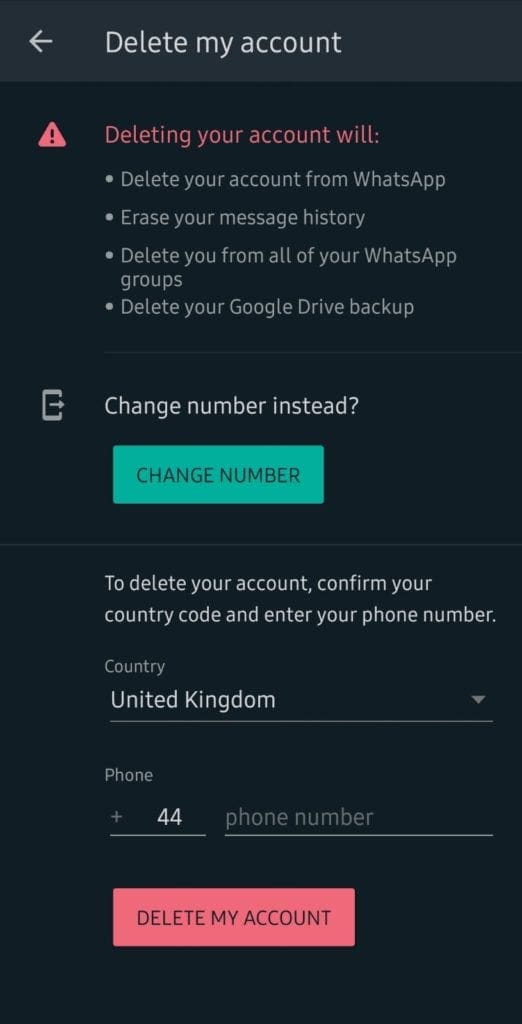
Confirmation screen

When you’ve done that, you can either create a new account or uninstall WhatsApp if you want to stop using it – either way, your old account will be gone!

Categories: Software

Author Mel Hawthorne

You Might Also Like

  • Fix Microsoft Teams Keeps Restarting

    Madalina DinitaSoftware
  • fix caa70007 microsoft teams

    Troubleshooting Microsoft Teams Error caa70007

    Madalina DinitaSoftware
  • MS Teams Header

    Microsoft Teams: How to Disable Animations

    Madalina DinitaSoftware
  • microsoft teams Enable Logging For Meeting Diagnostics

    Teams: Enable Logging for Meeting Diagnostics

    Madalina DinitaSoftware

Comments

  1. sunil says:
    June 28, 2023 at 12:36 am

    how to deactiviate my whatsapp without having sim

Leave a Reply

Your email address will not be published. Required fields are marked *

This site uses Akismet to reduce spam. Learn how your comment data is processed.

300x600
Turning on Triple Touch Zoom on Android

Turning on Triple Touch Zoom on Android

How to Connect Outlook 2023 to Gmail

How to Connect Outlook 2023 to Gmail

Netflix: Change Password

Netflix: Change Password

Everything You Need to Know About WhatsApp Delete for Me

Step-by-Step Guide: How to Use WhatsApp on Your Computer

Android: Enable or Disable Background Data

Android: Enable or Disable Background Data

300x250
profile pic

The Experts Behind Technipages

My name is Mitch Bartlett. I've been working in technology for over 20 years in a wide range of tech jobs from Tech Support to Software Testing. I started this site as a technical guide for myself and it has grown into what I hope is a useful reference for all.

Learn More

300x250 2
technipages logo white
linkedin icon

Technipages is part of Guiding Tech Media, a leading digital media publisher focused on helping people figure out technology. Visit guidingtechmedia.com to learn more about our mission and team.

© 2026 Guiding Tech Media All Rights Reserved

  • About Us
  • Contact
  • Legal & Privacy

© 2026 Guiding Tech Media All Rights Reserved

Information from your device can be used to personalize your ad experience.
Do not sell my personal information.