

Your Samsung Galaxy S10 phone plan may include what companies may call “unlimited data,” but there are almost always restrictions. The carrier may slow your service down after you have used a specific number of GB or start charging you ridiculous prices. There are many people who have a set amount of data each month to begin with, such as 5 or 10 GB. To these users, each MB is precious.
Some apps on your device depend on using up data in the background – or transferring data even when it is not being used. If you restrict the background data on any of these apps, you will save some of those bytes, but the apps may not work properly unless you are connected to Wi-Fi.
It is a tough call – and personal choice – to decide whether or not you wish to restrict the data usage of certain apps. Research each one to see what is and is not transmitted when they are not in use, and decide which ones you can safely disable.
Use these steps to disable background data on the Samsung Galaxy S10.
WiFi Background Data Setting
- Open up your “Settings” that you are well used to by now.
- Scroll to and tap on “Connections.”
- Now choose “Data Usage.”
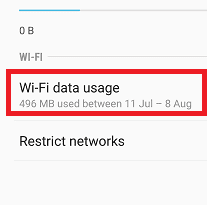
- Tap on “WiFi Data Usage.”

- Choose the app you have decided to disable mobile data usage for.

- Select “Allow Background Data Usage,” which will turn it OFF. (Note that this is already ON by default for most apps.)

Mobile Network Background Data Setting
This process is pretty much the same and will ensure apps you choose will not use up any data in the background from your mobile connection when you are not near WiFi. I personally have several apps turned off on my phone so that they are not consuming my precious data! Turning this off is just as simple as the other option above:
- Open up your “Settings” app as usual.
- Head back into “Connections.”
- Now, tap on “Data Usage” once more.
- Under the “Mobile” section, choose “Mobile Data Usage.”
- Choose the app you wish to toggle off.
- Tap on that “Allow Background Data Usage” to turn it off.
That’s all there is to it!
How much data do YOU have allotted from your carrier each month? How much do you tend to actually use? Are you getting too close to your cutoff for comfort? I hope this article helped you in some way to save those bits and bytes!



Similar problem purchased an S10 and within 2 days had used over 400mb had to purchase another 500mb to save excess charges I had an S6 before and never had this probleem
I have just purchased today s10 and without even using it its states I’ve nearly used 1g when I had a iPhone 6 s this did not happen -is there a fault or is this normal as then this is not the phone for me sadly
My phone us using too much even I restricted all apps. What can I do?
My wife’s S10 is using mobile data even while connected to wifi. It’s very specific. Its fairly large chunks of data every 3hrs exactly. Some of these have been over 500mb in size. Any ideas how to stop this? I thought it was syncing but it’s not, that’s all shut off. But even when I know she’s on wifi, it’ll chew through mobile data for this data transfer.