Skip to content
LogoTechnipages
technipages logo
  • Topics
        • Android
        • Browsers
        • Gaming
        • Hardware
        • Internet
        • iPhone
        • Linux
        • macOS
        • Office
        • Reviews
        • Software
        • Windows
        • Definitions
  • Product Reviews
  • Downloads
  • About

Android: Fix “Process com.android.settings stopped unexpectedly” Error

Mitch BartlettFebruary 11, 2017 Comments (17)

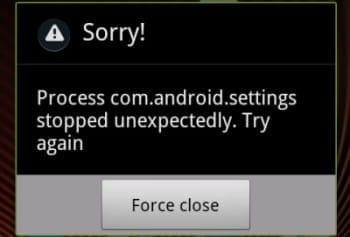
I recently experienced a problem with my Google Pixel where the Settings app would crash every time I plugged the device in. It would throw an error that said “Process com.android.settings stopped unexpectedly. Try again.” The only option is to “Force Close” .

Since the settings app is ultimately the thing that’s crashing here, it will need to be reset. That means you’ll lose a few custom settings such as your wallpaper. Follow these steps to solve the problem.

Fix 1

If you can still somehow access “Settings”, try these steps first.

  1. Select “Settings“.
  2. Choose Apps.
  3. Ensure that “All apps” is selected in the dropdown menu.
  4. Scroll down and select “Storage“.
  5. Select “Clear data“.

Fix 2

Use the Android ADB tools on a PC to clear settings data.

  1. Download and unzip the Android ADB tools on a PC.
  2. Enable Developer Mode on your Android device.
  3. Connect your device to the computer using a USB cable.
  4. From a command line, use ADB by issuing the following command, then pressing “Enter“:
    adb shell pm clear com.android.settings

Now you should be able to use your Android device again without crashes when plugging it in or setting USB settings.
Categories: Android

Author Mitch Bartlett

My name is Mitch Bartlett. I've been working in technology for over 20 years in a wide range of tech jobs from Tech Support to Software Testing. I started this site as a technical guide for myself and it has grown into what I hope is a useful reference for all. Mitch's Favorite Gear ATX Graphics Card CanaKit Raspberry Pi 3

You Might Also Like

  • Steps to Try When Your Android Won’t Boot

    Mitch BartlettAndroid
  • Kindle Fire settings gear icon

    Kindle Fire: Locate MAC Address, Serial Number or OS Version

    Mitch BartlettAndroid
  • Use Samsung Secure Folder Hero

    How to use Samsung Secure Folder on Galaxy S21

    Andrew MyrickAndroid
  • Measure-Distance-Walked-Google-Maps

    Always Use Google Maps in Satellite View

    Judy SanhzAndroid

Comments

  1. Nobody says:
    December 21, 2020 at 7:41 am

    Doesn’t work even if you already have developer mode enabled

  2. Leroy sane says:
    February 12, 2020 at 10:39 pm

    There is no storage in app setting

  3. kewichle says:
    November 13, 2019 at 10:03 pm

    didnt help me since i cant get to my debugging to turn it on, cause all in all my settings are crashing.

  4. Saraswathi says:
    May 29, 2019 at 4:08 am

    I can’t go to my settings to do anything

  5. Dorothy says:
    May 24, 2019 at 11:24 am

    My setting has unfortunately stop how can I fix it.

  6. Dorothy Smith says:
    May 24, 2019 at 11:20 am

    My setting has stop and i can’t fix it myself what do i do.

  7. Zoe says:
    May 21, 2019 at 4:13 pm

    I can’t get to my settings. It says it’s stopped unexpectedly. I can’t get into to do what you said to do. Now what do I do ?

  8. Phil says:
    May 17, 2019 at 1:23 pm

    Sadly neither fix works if settings are inaccessible because it crashes right away

  9. Pops says:
    May 15, 2019 at 9:51 pm

    How do i get into setting to turn off the screen light its. Stuck on and won’t let me back into setting to put back on seconds

  10. R.Narayanan says:
    September 17, 2018 at 7:42 am

    The problem is by mistake the Tan went to the factory reset. With the result my brcases is not working g and I’m getting web page is not available. How to fix it. Please help

  11. ? karen comb says:
    June 17, 2018 at 12:53 am

    What if ya cant get on the phone at all

  12. Someone says:
    February 2, 2018 at 12:46 am

    How will I enter developer mode if I can’t form use the settings??

  13. selwyn says:
    December 2, 2017 at 10:22 am

    When i want to go in by my developer option then it says process com.android.settings has stop

  14. Mitch Bartlett says:
    September 16, 2017 at 8:06 pm

    Sometimes. I would personally get this error intermittently, and I was able to quickly perform these steps so that it would no longer happen.

  15. Vitaly says:
    September 16, 2017 at 12:24 pm

    To use Fix 1, I must start ‘Settings’

    To use Fix 2, I must enable Developer mode, To do this I must use ‘Settings’

    But initial problem is that ‘Settings’ does not start entirely. With ‘Process com.android.settings stopped unexpectedly’

    So looks like chicken and egg problem.

  16. Jose says:
    March 27, 2017 at 10:52 pm

    it seems it ran on my device, and yet i still having same issue

  17. Aaron says:
    March 17, 2017 at 1:26 pm

    I can’t even click on storage its says that

Leave a Reply

Your email address will not be published. Required fields are marked *

This site uses Akismet to reduce spam. Learn how your comment data is processed.

300x600
Turning on Triple Touch Zoom on Android

Turning on Triple Touch Zoom on Android

How to Connect Outlook 2023 to Gmail

How to Connect Outlook 2023 to Gmail

Netflix: Change Password

Netflix: Change Password

Everything You Need to Know About WhatsApp Delete for Me

Step-by-Step Guide: How to Use WhatsApp on Your Computer

Android: Enable or Disable Background Data

Android: Enable or Disable Background Data

300x250
profile pic

The Experts Behind Technipages

My name is Mitch Bartlett. I've been working in technology for over 20 years in a wide range of tech jobs from Tech Support to Software Testing. I started this site as a technical guide for myself and it has grown into what I hope is a useful reference for all.

Learn More

300x250 2
technipages logo white
linkedin icon

Technipages is part of Guiding Tech Media, a leading digital media publisher focused on helping people figure out technology. Visit guidingtechmedia.com to learn more about our mission and team.

© 2026 Guiding Tech Media All Rights Reserved

  • About Us
  • Contact
  • Legal & Privacy

© 2026 Guiding Tech Media All Rights Reserved

Information from your device can be used to personalize your ad experience.
Do not sell my personal information.