Skip to content
LogoTechnipages
technipages logo
  • Topics
        • Android
        • Browsers
        • Gaming
        • Hardware
        • Internet
        • iPhone
        • Linux
        • macOS
        • Office
        • Reviews
        • Software
        • Windows
        • Definitions
  • Product Reviews
  • Downloads
  • About

Teams Live Events: Disable Anonymous Questions

Madalina DinitaApril 19, 2023 Comments (0)
microsoft teams live events disable anonymous questions

Microsoft Teams Live Events is a great tool to broadcast live video events to a large audience. If you’re planning to host an online event with hundreds or thousands of participants, Teams Live Events won’t let you down.

But there’s one thing that many users don’t really like about Teams live events. Some people may sometimes ask inappropriate questions anonymously. If you’re looking for a method to block anonymous questions in these events, keep reading this guide.

How to Prevent Anonymous Questions in Teams Live Events

Let’s set one thing straight from the very beginning. There is currently no option to block anonymous questions in Teams live events.

As a workaround, you can disable Q&A. This will prevent users from sending in questions during live events. To clarify, you cannot prevent people from posting anonymous questions. Even registered users can still choose to post anonymously. However, presenters and producers can reject those questions and so they won’t be published.

How to Disable Anonymous Questions in Microsoft Teams meetings

The only way you can block anonymous questions during Microsoft Teams meetings is to not allow people to join the meeting anonymously. You can do that at the admin level. If you don’t have access to the Teams Admin Center, ask your IT admin to make all the necessary changes.

  1. Go to the Teams Admin center and click on Meetings.
  2. Then select Meeting settings and navigate to Participants.
  3. Turn off Anonymous users can join a meeting.
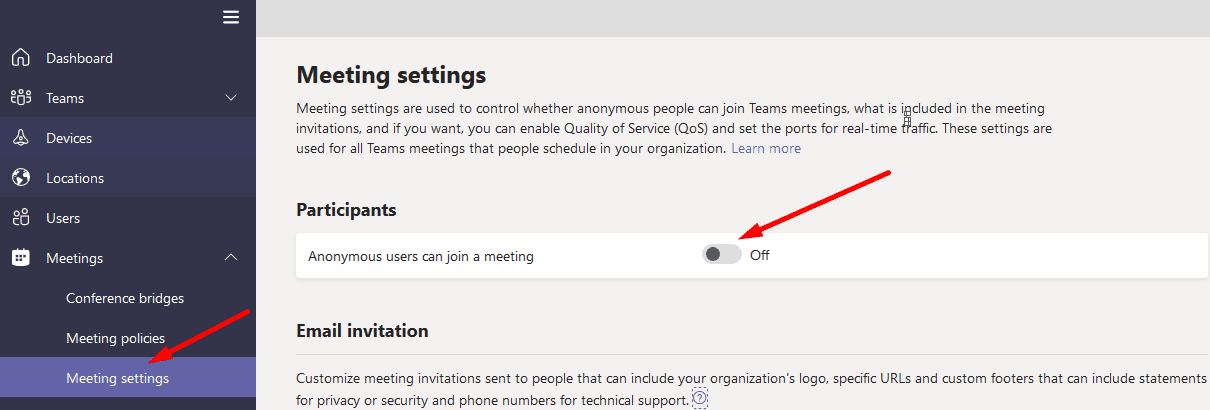
Anonymous users can join a meeting

This setting will prevent anonymous users from attending the meeting. As a result, you won’t get anonymous questions. Once again, if you already allowed anonymous users to join Teams meetings, you can’t avoid anonymous questions.

On the other hand, if you’re hosting a conference to promote a product and expect thousands of attendees, blocking anonymous users is not a good idea.

Conclusion

Currently, it is not possible to disable anonymous questions in Microsoft Teams Live Events. Even if users are registered to the platform, they can still choose to send anonymous questions. Teams users already asked Microsoft to add the option to disallow anonymous Q&A questions.

What’s your take on this situation? Do you think Microsoft will implement such a feature shortly? Share your thoughts in the comments below.

Categories: Software

Author Madalina Dinita

You Might Also Like

  • Magnifying Glass

    What is File Extension XPS and How to Open It

    Kat ArmstrongmacOS
  • Google Sheets: Add Multiple Lines of Text in Single Cell

    Kat ArmstrongSoftware
  • microsoft teams not compatible with ipad error

    How to Create a Focus on iPadOS 15 – The Complete Guide

    Judy SanhzSoftware

Leave a Reply

Your email address will not be published. Required fields are marked *

This site uses Akismet to reduce spam. Learn how your comment data is processed.

300x600
Turning on Triple Touch Zoom on Android

Turning on Triple Touch Zoom on Android

How to Connect Outlook 2023 to Gmail

How to Connect Outlook 2023 to Gmail

Netflix: Change Password

Netflix: Change Password

Everything You Need to Know About WhatsApp Delete for Me

Step-by-Step Guide: How to Use WhatsApp on Your Computer

Android: Enable or Disable Background Data

Android: Enable or Disable Background Data

300x250
profile pic

The Experts Behind Technipages

My name is Mitch Bartlett. I've been working in technology for over 20 years in a wide range of tech jobs from Tech Support to Software Testing. I started this site as a technical guide for myself and it has grown into what I hope is a useful reference for all.

Learn More

300x250 2
technipages logo white
linkedin icon

Technipages is part of Guiding Tech Media, a leading digital media publisher focused on helping people figure out technology. Visit guidingtechmedia.com to learn more about our mission and team.

© 2026 Guiding Tech Media All Rights Reserved

  • About Us
  • Contact
  • Legal & Privacy

© 2026 Guiding Tech Media All Rights Reserved

Information from your device can be used to personalize your ad experience.
Do not sell my personal information.