
Best Rugged Hard Drive

- LaCie Rugged SSD Pro

Best All-Round Hard Drive
- Samsung T5 SSD

Best Budget Hard Drive
- Buffalo MiniStation Extreme NFC

If you’ve got any important documents or files on your computer, you should probably back them up. If you only have a single copy of your important data, then you run the risk that you could lose it if something bad happens. For example, if you get a virus, your hard drive gets corrupted, your device gets stolen, or it gets damaged, you could lose important files.
To protect yourself from this risk, it’s important to back up your data. Cloud backups are a great option, but you have to keep paying for it, and it’s reliant on your internet speed. This can make it a pain to regain access to large files quickly if you don’t have a solid internet connection. The alternative is to use an external hard drive as a backup device. External hard drives can be a little expensive to start off with, especially for large capacities, and high speeds, but after the initial investment, you don’t have any running costs.
When choosing an external hard drive, it’s important to consider how much space you need, as this will be a big factor in the cost. It’s also important to consider whether you want an HDD or SSD, with the latter being much faster, but also more expensive. If you do go for an SSD, double-check the connection type, there’s no point in having a fast drive and a slow USB 2.0 connection. Finally, some external hard drives offer extra features, such as a rugged exterior for safety on the go, or full drive encryption for maximum data security and privacy.
To help you pick a solid device, we’ve drawn up a list of the best external hard drives of 2021.
Key Features
- AES-256 encryption
- Shock, water, and dust resistant
- NFC card used to decrypt the device
Specifications
- 1, 2TB
- USB 3.0
- 300g
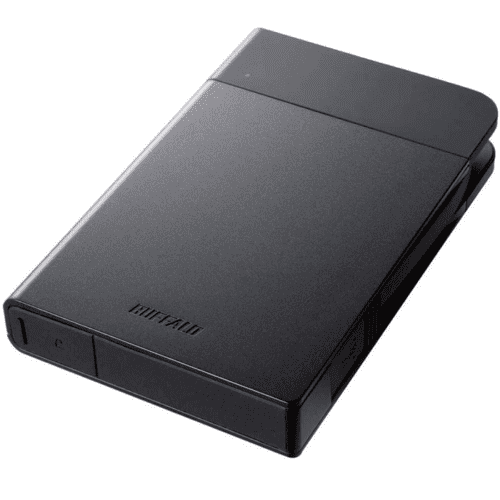
 The Buffalo MiniStation Extreme NFC is a one or two terabyte external HDD. The NFC in the name indicates that it includes an NFC smart card and reader that can be used to decrypt the drive. This is optional, however, and you can choose to decrypt with a password, or not encrypt the drive at all.
The built-in USB cable helps this drive achieve an IP53 dust and water resistance rating, which means it can survive small splashes of water, but not being submerged. The exterior is ruggedised to US military-grade shock protection standards allowing it to survive drops from up to 1.2 metres. For the best transfer speeds, you need to connect it to a USB 3.0 port. To help you see if you’re connected to USB 3.0 there’s a small indicator light that glows blue for USB 3.0 and green for the slower USB 2.0.
- Indicator light for USB 2.0 or 3.0
- Built-in USB cable
- Possible to lose the NFC decryption card
- The optional software isn’t great
- A little bulky

Key Features
- Optional AES-256 encryption
- Drop resistant
- Tiny
Specifications
- 250, 500GB & 1, 2TB
- USB 3.1 gen 2
- 51g
The Samsung T5 SSD is a tiny external drive. It measures just 57.3mm, 74mm, 10.5mm, and weighs just 51 grams. This makes it incredibly easy to transport, but also could make it slightly easier to lose. It comes in four capacities from 250GB to 2TB and uses a USB3.1 gen 2 connection for high transfer speeds of up to 540MB/s.
It has a USB-C port built-in and comes with a USB-C to USB-A and a USB-C to USB-C cable for optimal compatibility. It’s compatible with Android devices, so you back up your photos straight from your phone. With no moving parts and a metal exterior, it’s drop resistant to up to 2 metres. The main downside is that it can be a little pricey, especially for the higher capacities.
- Super portable
- USB-C
- Can connect to Android devices
- Potentially easy to lose
- Relatively expensive
Key Features
- IP67 water and dust resistance
- 3-metre drop tolerant
- Crush resistant up to 2 tons
Specifications
- 1, 2TB
- Thunderbolt 3, USB 3.0
- 100g
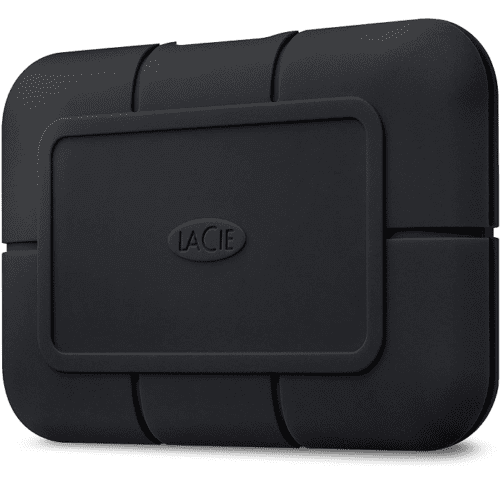
The Lacie Rugged SSD Pro is a fantastic option if you need high transfer speeds in a device that can withstand being outdoors and on the go. The drive itself has transfer speeds of up to 2800MB/s making it ideal for storing large amounts of data quickly, such as slow-motion or high-resolution video.
The rugged exterior protects it from 3-metre drops, being run over by a 2-ton car, and protects it from dust and submersion in up to a metre of water for 30 minutes. The drive comes in one and two terabyte capacities and connects via a thunderbolt-3 compatible USB-C port. The main downside of all this is that it is very expensive, but if you need a tough as nails high-speed external hard drive, it’s likely worth it.
- Extremely rugged
- Super-fast
- Expensive
Key Features
- Can send and receive files via Wi-Fi
- Can copy files from an SD card
- Built in-battery bank
Specifications
- 250, 500GB & 1, 2TB
- USB 3.0, Wi-Fi, SD card
- 450g
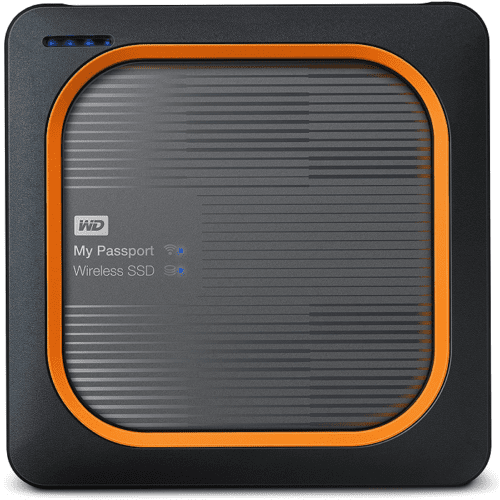
The WD My Passport Wireless SSD allows you to connect wirelessly to the device to both upload and download data. Multiple devices can even connect at one time and stream video files. The built-in battery can provide charge for up to 10 hours of operation and can also be used as a battery bank, although the charge speed is slow.
You can plug SD cards in directly and backup their data with a single button. USB 3.0 connections are also supported but there is no USB-C port. The drive can survive drops of up to a metre, even while in operation. The price is very high for the rated capacities, however, a cheaper and slower version is available that uses an HDD rather than an SSD.
- Up to 10 hours battery life
- 1-metre drop resistant
- An HDD version is available cheaper but is slower
- Excessively expensive for the capacities
- No USB-C

Key Features
- Ultra-high-speed
- Thermal monitoring system
- 2-metre drop resistant
Specifications
- 500Gb & 1, 2TB
- Thunderbolt-3
- 150g
The Samsung Portable SSD X5 uses a Thunderbolt-3 connection to get the most out of its high-speed SSD. It’s important to note, that the drive exclusively supports thunderbolt 3, it will not work when connected to standard USB Type-C ports, even though they use the same physical connector. It comes in three capacities between 500GB and 2TB.
The drive comes with optional AES-256 hardware encryption that uses a password to unlock. Its also drop resistant from up to 2-metres. The thermal monitoring system is designed to prevent the case itself, which acts as a heat sink, from heating above 45°C. This does, however, mean that the drive thermal throttles when performing longer transfers. The X5 is very expensive but as one of the fastest external drives available, it at least has a reason to command that price point.
- Optional AES-256 encryption with drive password
- Doesn’t support USB type-C
- Thermal throttles often
- Expensive
Those were our recommendations for the best external hard drives of 2021. Have you got one of the drives we recommended, how has your experience been with it?