Skip to content
LogoTechnipages
technipages logo
  • Topics
        • Android
        • Browsers
        • Gaming
        • Hardware
        • Internet
        • iPhone
        • Linux
        • macOS
        • Office
        • Reviews
        • Software
        • Windows
        • Definitions
  • Product Reviews
  • Downloads
  • About

Can You Hide Your Facebook Dating Profile?

Madalina DinitaMay 31, 2021 Comments (4)
hide-facebook-dating-profile

Facebook has a dating service similar to Tinder’s called Facebook Dating. If you haven’t found your soulmate yet, you can give Facebook Dating a try and let the digital Cupid find the right match for you. But maybe you don’t want your friends to learn you’re using Facebook Dating. Let’s see how you can keep your dating profile private.

Can You Be Invisible on Facebook Dating?

The good news is that Facebook has already thought about that. Your dating profile is automatically hidden from your Facebook friends who are also using the dating app. In other words, you can’t see their dating profile, and they can’t see yours.

facebook-dating

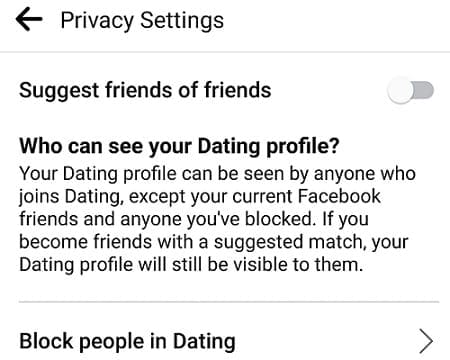
If you want to take this one step further, you can tweak your privacy settings and prevent Facebook from suggesting friends of your friends as potential matches.

  1. Navigate to Settings, click on General, and go to Privacy.facebook-dating-privacy-settings
  2. Then turn off Suggest friends of friends.

facebook-dating-disable-friends-of-friends

The Exception

Facebook Dating’s Secret Crush feature lets you create a list of up to nine friends you have a crush on. The catch is that if they also add you to their crush list, they’ll be able to see you’re using Dating. It seems that’s the only way your friends can find you on Facebook Dating.

Rest assured, your Facebook friends won’t receive any notifications that you joined Dating. No dating-related information will appear on your News Feed. Your regular Facebook account and your Dating profile are two different things.

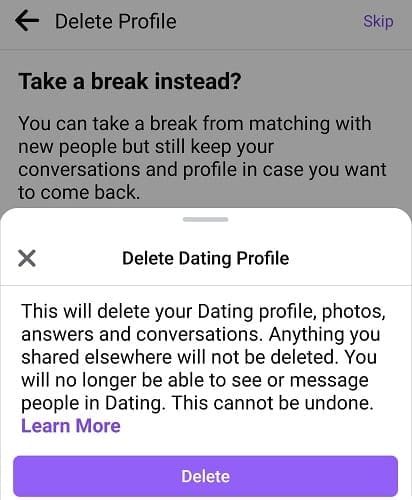
If you no longer wish to use Facebook Dating, you can delete your profile and keep your Facebook account active. To do that, go to Dating Settings, select General, and then Delete profile.
delete-facebook-dating-profile

On the other hand, if you decide to delete your Facebook account, your Dating profile will automatically get deleted.

Conclusion

There are two ways your Facebook friends can learn you’re using the Dating service: if you tell them, or they add you to their crush list. Otherwise, your dating profile is hidden from your Facebook friends.

Do you use Facebook Dating? Compared to other dating apps out there, why do you prefer Facebook’s dating service? Let us know in the comments below.

Categories: Internet

Author Madalina Dinita

You Might Also Like

  • How to Set Viewing Reminders in YouTube

    MonaInternet
  • What Is Cyber War?

    Mel HawthorneInternet
  • How to Remove a Hacker From My Phone The Ultimate Guide

    What Is Hacktivism?

    Mel HawthorneInternet
  • How to Cancel Your Google One Membership

    Judy SanhzInternet

Comments

  1. Peter says:
    October 1, 2022 at 1:48 am

    I have the same problem. I deleted my Facebook dating profile and I can’t find the dating back I need it my dating back, how to do that ?

  2. John says:
    January 30, 2022 at 3:01 am

    I cannot locate my facebook dating app on my phone, on fb. Where is it? Did I accidentally delete it?? how can I put it back on?

  3. Lisa says:
    November 14, 2021 at 8:22 am

    If I temporarily hide my main Facebook page, can I still use the Facebook dating app.

  4. Ramiro says:
    November 11, 2021 at 11:33 pm

    I deleted my Facebook dating profile and I can’t find the dating back I need it my dating back

Leave a Reply

Your email address will not be published. Required fields are marked *

This site uses Akismet to reduce spam. Learn how your comment data is processed.

300x600
Turning on Triple Touch Zoom on Android

Turning on Triple Touch Zoom on Android

How to Connect Outlook 2023 to Gmail

How to Connect Outlook 2023 to Gmail

Netflix: Change Password

Netflix: Change Password

Everything You Need to Know About WhatsApp Delete for Me

Step-by-Step Guide: How to Use WhatsApp on Your Computer

Android: Enable or Disable Background Data

Android: Enable or Disable Background Data

300x250
profile pic

The Experts Behind Technipages

My name is Mitch Bartlett. I've been working in technology for over 20 years in a wide range of tech jobs from Tech Support to Software Testing. I started this site as a technical guide for myself and it has grown into what I hope is a useful reference for all.

Learn More

300x250 2
technipages logo white
linkedin icon

Technipages is part of Guiding Tech Media, a leading digital media publisher focused on helping people figure out technology. Visit guidingtechmedia.com to learn more about our mission and team.

© 2026 Guiding Tech Media All Rights Reserved

  • About Us
  • Contact
  • Legal & Privacy

© 2026 Guiding Tech Media All Rights Reserved

Information from your device can be used to personalize your ad experience.
Do not sell my personal information.