

Creating memes is a must when you want to make fun of something. If you can’t find the meme, you need you can always create your own. That way, you can choose the perfect image to go with the text you have in mind.
The following list will have fun and free apps you can use to create your own memes. You can use your own images, or you can use the images the app has to offer.
1. Meme Generator Free

Meme Generator Free is one of the most popular apps on Google Play when making memes. When you first open the app, you’ll see various tabs at the top that’ll help you find the perfect image for your meme. You can choose from options such as:
- Categories
- All
- New
- Popular
- Favorite
- Random
By tapping on the menu lines at the top left to access options such as saves memes, editable templates, video memes, background and grids, custom memes, and GIF memes. To create your custom meme, tap on the button that says just that at the bottom right.
Choose an option from the list. You can choose from options such as Gallery and other sources, camera, tenor GIFs, breaking news, and collage/multi-panel meme. You’ll also need to choose if you want your meme to have a classic layout or a modern one.

You can add stickers, effects and even if you’ve chosen one style meme, you can always change that later.
2. Memes Maker and Generator + Funny Video Meme Creator

Meme Maker Generator and Funny Video Meme Maker is another popular app that’ll give you various options. With this app, you can see the video and picture GIFs other users have created. If you would go straight to meme-making, tap on the plus symbol at the bottom.
You can choose from various designs such as custom, story, square, portrait, and landscape. You can also create covers for Facebook/Twitter/Pinterest. The app will also show you trending templates if you want to see what’s popular.

You can also customize the text of the meme. You can make the text bold, italic, edit the size, font, and color.
3. Mematic

An app that keeps things simple is Mematic. You can make memes with different styles, such as black and white and traditional (among others). The meme can have one or various pictures to make it even better.
Not all options are free; if you want full access to the app, you’ll need to go Pro for $4.99 a month or $29.99 a year. You can change the background color, size, font, color and even add a custom watermark.
4. Memasik – Meme Maker Free

Memasik offers a large base so you can find the right image for your meme. You can use your own images or the ones the app has to offer. There are also options to give the text a different look, and you can make it as big or small as you want.
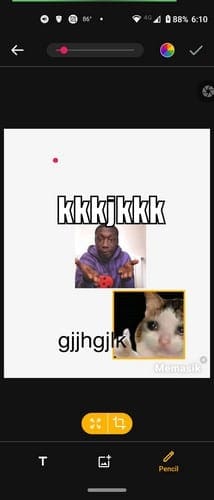
Memasik also lets you add another image on top of the one you already chose. If you’re not happy with the size, there’s a cropping tool to give it the right size. Tap on the pencil icon to draw on your image with a large variety of colors.
5. Meme Generator – Create Funny Memes

With Meme Generator – Create Funny Memes, take a picture for your meme, or upload one from your device’s gallery. This app won’t add a watermark to your meme, and you can choose from different categories. For example, you can choose from:
- Humans
- Animals
- Cartoon
- Rage
- Network
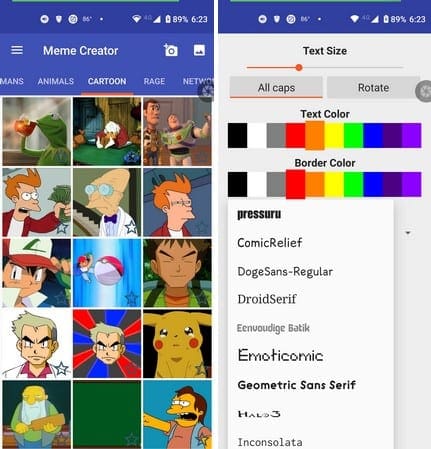
You can customize the text with different fonts and colors, and you can also rotate it. Rotate the text if that’s what you feel like doing. The app has a lot of good images you can work with to create one funny meme.
Conclusion
Memes are always a source of a good laugh. When you can’t find one to use, you have no other choice but to create them yourself. Hopefully, one of the apps listed here will help you create that one meme that’ll go viral. Which app are you going to start with? Let me know in the comments below, and don’t forget to share the article with others on social media.


